
 27 August 2024

Workflow for QA Testing: A 2026 Step-by-Step Guide
23 May 2026
 8:33 MIN Read time
  BY
Aparna Arangil
BY
Aparna Arangil
Ad hoc testing feels productive until a critical bug ships to production on release day. For most QA engineers and team leads, the real problem is not a lack of effort. It is the absence of a repeatable, documented workflow for QA testing that everyone on the team follows. Without structure, testing becomes reactive. Defects pile up, regression cycles stretch, and no one quite agrees on what “done” means. This guide walks you through every phase of a quality assurance workflow, from setup and planning through advanced AI-assisted practices, so you can build a process that actually holds under pressure.
Table of Contents
- Key takeaways
- What an effective workflow for QA testing actually requires
- The core QA testing phases, step by step
- Advanced practices: AI and preview environments
- Common pitfalls and how to fix them
- My take on AI, human judgment, and where QA is heading
- How Testvox can strengthen your QA testing workflow
- FAQ
Key takeaways
| Point | Details |
|---|---|
| Follow a four-phase workflow | A structured QA testing process covers planning, test design, execution, and reporting in defined time ratios. |
| Set up tools and roles first | Defining team responsibilities and choosing the right test management tools before execution prevents costly mid-cycle confusion. |
| Use AI as a force multiplier | AI accelerates repetitive tasks but cannot replace human judgment on business risk and edge-case identification. |
| Customize your defect states | Custom Jira workflow states like “Ready for QA” and “QA Failed” dramatically improve team visibility and accountability. |
| Embed retesting into CI/CD | Bug-fix pull requests should include a reproducing test case that becomes a permanent part of your regression suite. |
What an effective workflow for QA testing actually requires
Before you write a single test case, you need the right foundation. Most QA workflows break down not during execution but during the setup phase, when roles are fuzzy, environments are unstable, or tools do not talk to each other.
Roles and responsibilities
Every person on the team needs a clear lane. The QA lead owns test strategy and risk prioritization. Test engineers write and execute test cases. Automation engineers build and maintain scripts. Developers are responsible for providing testable builds and fixing verified defects. When these boundaries blur, defects fall through the cracks.
Environments and test data
Your test environment should mirror production as closely as possible. That means matching infrastructure, third-party service stubs, and realistic data sets. Testing on a degraded environment produces results that do not translate to real user conditions. Prepare sanitized data sets for each test scenario in advance, not on the fly.
Tool selection
The tools you choose shape how well your QA testing process scales. Here is a practical reference:
| Tool Category | Purpose | Examples |
|---|---|---|
| Test management | Organize test plans, cases, and results | TestRail, Zephyr |
| Defect tracking | Log, prioritize, and track bugs | Jira, Linear |
| Automation framework | Execute scripted regression tests | Selenium, Playwright, Cypress |
| CI/CD integration | Trigger tests on every code change | GitHub Actions, Jenkins |
| Performance testing | Measure load and response times | k6, JMeter |
Integrating your automation framework directly with your CI/CD pipeline means tests run on every pull request. That catches regressions before they reach the main branch, not after.
Pro Tip: When selecting tools, favor those with open APIs and plugin ecosystems. Your stack will grow, and tools that cannot integrate cleanly will become bottlenecks as your QA needs evolve.
Collaboration between developers and testers also depends on shared tooling. When both teams work inside the same defect tracker and see the same test results, developer-tester collaboration becomes a workflow asset rather than a coordination tax.
The core QA testing phases, step by step
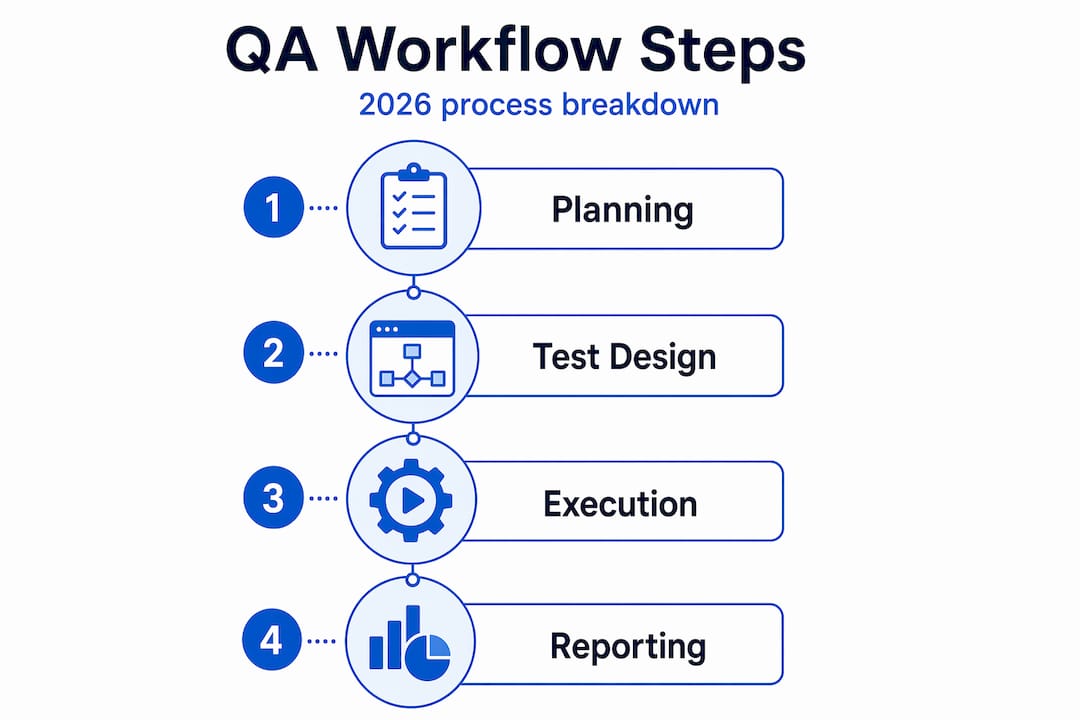
Industry best practices for 2026 define four core phases with specific time allocations: Planning and Requirements at 15 to 20 percent, Test Design and Case Creation at 25 to 30 percent, Execution and Defect Tracking at 40 to 50 percent, and Reporting and Documentation at 10 to 15 percent. Understanding where your time should go is the first step to recognizing where your current process is misallocated.

Phase 1: Planning and requirements analysis
This is where you define scope, identify risk areas, and document your test strategy. Sit down with product managers and developers to clarify acceptance criteria before a single test case gets written. Use risk-based testing to prioritize features by impact and likelihood of failure. High-risk, high-value features get deeper test coverage. Low-risk features get lighter smoke testing.
Phase 2: Test design and creation
Write test cases that are specific, reproducible, and tied directly to requirements. A test case with vague steps like “verify the login works” is nearly useless. A strong test case specifies the preconditions, exact input values, expected output, and the pass/fail criteria. Prepare your test data during this phase, not after. Waiting until execution to realize you have no test accounts with the right permissions is a common time killer.
Phase 3: Execution and defect tracking
This is where the bulk of your time lives. Work through your test plan systematically. When you find a defect, document it with enough detail for a developer who was not present to reproduce it independently. That means environment specs, steps to reproduce, expected versus actual results, and a severity rating. Vague bug reports generate back-and-forth that multiplies cycle time.
Phase 4: Reporting and documentation
Stakeholders need a clear picture of quality, not a raw list of open bugs. Your report should cover total tests run, pass rate, defect count by severity, and test coverage percentage against requirements. Keep it short enough for a product manager to read in three minutes.
Here is a numbered checklist of the key steps across all four phases:
- Define test scope and acceptance criteria with the product team
- Conduct a risk assessment to prioritize test coverage
- Document the test strategy and get sign-off
- Write test cases with specific inputs, steps, and expected outputs
- Prepare test data sets and environment configurations
- Execute test cases and log all results
- Report defects with full reproduction steps and severity ratings
- Triage defects with developers and agree on fix timelines
- Retest fixed defects and update regression suite
- Generate a test summary report with coverage and quality metrics
Advanced practices: AI and preview environments
The most significant shift in the QA testing lifecycle right now is the move toward hybrid workflows that combine automated AI-driven mechanics with human strategic judgment. This is not a future trend. It is already in use at teams shipping complex applications at speed.
How AI fits into your workflow
Agentic AI testing operates on a four-phase loop: Analyze, Generate, Execute, and Adapt. The system examines the application, generates test scripts, runs them, and then updates the scripts when the UI or API changes. This self-healing behavior dramatically cuts the time QA engineers spend on script maintenance. Pair this with an AI-driven shift-left workflow and you can catch defects earlier, at the unit and integration level, before they compound into system-level failures.
AI also helps surface connected workflows and impacted areas when code changes. That means your team can focus human validation where it matters most rather than running exhaustive manual sweeps across unchanged features.
The limits of AI in QA
Here is where many teams get burned. Banking QA professionals describe AI as not knowing “where the bodies are buried.” It accelerates repetitive tasks like regression analysis and scenario generation, but it has no awareness of business risk, organizational history, or the specific ways your users behave unexpectedly. That contextual knowledge lives in your QA engineers.
Key considerations when integrating AI into your test automation strategy:
- AI excels at generating baseline test coverage from code or specifications
- It cannot assess whether a scenario matters to your business without human input
- Self-healing scripts reduce maintenance but still require human review cycles
- AI coverage analysis shows what was tested, not what should have been tested
- Human review of AI-generated test suites should be a formal workflow step
Preview environments
Preview environments spun up from Git branches give each pull request its own isolated, production-like testing surface. QA engineers no longer wait in a queue for a shared staging environment. They test the exact code change in isolation, find issues faster, and give developers more precise feedback. This removes one of the most common bottlenecks in agile testing workflows: environment contention.
Pro Tip: Set up branch-specific environments using your CI/CD pipeline triggers. Make the environment URL automatically posted to the pull request. That eliminates the “what environment do I test on?” question before anyone has to ask it.
Common pitfalls and how to fix them
Even well-intentioned QA workflows drift over time. Here are the most common places things break down, along with practical fixes:
| Common Pitfall | Impact | Solution |
|---|---|---|
| Skipping root cause analysis on defects | Same defects recur in future releases | Require a root cause note in every closed bug ticket |
| Vague defect documentation | Developers cannot reproduce issues independently | Enforce a defect template with mandatory fields |
| Environment unavailability blocking testing | Execution delays push release dates | Adopt preview environments or schedule dedicated QA environment slots |
| No retesting process for bug fixes | Fixed bugs regress undetected | Follow agile retesting best practices and add fixes to regression suite |
| Custom workflow states missing in Jira | Defects get lost between teams | Add states like “Ready for QA” and “QA Failed” with transition validators |
On the retesting point: agile retesting best practices specify that every bug-fix pull request should include a test case that reproduces the original failure. That test case then becomes a permanent part of your regression suite. It is one of the simplest changes a team can make, and it compounds in value every sprint.
For workflow visibility inside Jira, custom QA workflow states like “Ready for QA,” “In Testing,” “QA Failed,” and “Blocked” with auto-assignments and transition validators give the entire team a real-time picture of where every defect stands. Combined with the structured retesting approach of reproducing failures, understanding the fix, running boundary and negative tests, and validating in a production-like environment, your team gains a process that does not rely on informal communication to stay on track.
Optimize your broader software workflow by treating QA states as first-class workflow steps, not add-ons bolted to the end of the development process.
My take on AI, human judgment, and where QA is heading
I have watched a lot of teams adopt AI testing tools with genuine enthusiasm, only to discover six months later that their test coverage numbers look great while their defect escape rate is unchanged. The issue is not the tools. It is the belief that coverage metrics equal quality assurance.
In my experience, the teams that get the most out of AI in QA are the ones that use it to handle the mechanical work while their engineers focus on the questions AI cannot answer. Things like: “Given what we know about how this customer segment uses the product, where are they likely to hit edge cases?” or “What would a frustrated user do that no test script would ever try?” Those questions require domain knowledge and judgment that no model currently has.
The hybrid testing model is the right direction, but only when teams are honest about where AI ends and strategic QA begins. What I have found is that QA leads who try to replace headcount with AI tools end up with fast, wide, shallow test coverage. The bugs that matter most, the ones with real business consequences, still require a person who understands the product.
My advice: let AI own the regression. Let your engineers own the risk.
— Testvox
How Testvox can strengthen your QA testing workflow
If you are looking for a QA partner who has built and optimized testing workflows for fintech platforms, e-commerce applications, and Y Combinator startups, Testvox has the track record to back it up.

From quick QA auditing for startup teams to AI-augmented regression programs and VAPT security reviews, Testvox works as an extension of your development team. Our AI testing services integrate directly with your CI/CD pipeline, giving you self-healing test coverage without the overhead of building it from scratch. And if you want to see what a long-term QA partnership looks like in practice, our five-year case study shows exactly how we refine and scale workflows over time. Reach out to Testvox to discuss your current QA process and where it can go.
FAQ
What are the four main phases of a QA testing workflow?
The four core phases are Planning and Requirements, Test Design and Case Creation, Execution and Defect Tracking, and Reporting and Documentation. Industry best practice allocates roughly 15 to 20 percent of effort to planning, 25 to 30 percent to design, 40 to 50 percent to execution, and 10 to 15 percent to reporting.
How does AI fit into a modern QA testing workflow?
AI handles repetitive tasks like regression test generation and script maintenance through self-healing mechanisms, but it requires human oversight for business risk assessment and edge-case identification. The most effective approach combines AI-driven automation with human strategic judgment.
What Jira workflow states improve QA visibility?
Adding custom states such as “Ready for QA,” “In Testing,” “QA Failed,” and “Blocked,” along with transition validators and auto-assignments, gives teams real-time visibility into every defect and prevents issues from stalling between teams.
How should teams handle retesting in an agile QA workflow?
Every bug-fix pull request should include a test case that reproduces the original failure. That test case is then added permanently to the regression suite, so the same issue cannot silently reappear in a future release.
What is a preview environment and why does it matter for QA?
A preview environment is a temporary, production-like environment spun up automatically from a Git branch. It allows QA engineers to test a specific code change in isolation without competing for a shared staging server, which speeds up feedback cycles and removes one of the most common bottlenecks in agile testing.
Recommended
- Transform QA: A Step-by-Step Guide to Playwright Automation
- Upgrade Your QA Strategy with Playwright Automation
- The Role of Automation in QA: 2026 Guide for IT Managers
- No QA Team Yet? How AI-Augmented Testing Helps Startups Ship Faster Without Hiring a Full QA Team. – Testvox
27 August 2024
 31 October 2023
 27 November 2025

ABOUT TESTVOX

Testvox is a software testing company help your product reach its full potential. Get full cycle testing for your mobile and web applications while ensuring all quality assurance standards are met... Read More
100+
Applications
Assured
Assured

5 Star Rating

5 Star Rating
“By participating in our release lifecycle, Testvox's standard QA process has helped us to launch quality products faster.”

Rima Hudaifa
Manager | Cadvil
Manager | Cadvil
