




UAE
Testvox FZCO
Fifth Floor 9WC Dubai Airport Freezone
 BY
Testvox
BY
Testvox
Your fintech or e-commerce startup is ready to ship. The feature is built, the team is excited, and your launch date is locked in. Then QA runs its cycle, and two days disappear. This happens sprint after sprint, not because your engineers are slow, but because manual testing and poorly configured automation are structurally inefficient. Leading engineering teams in India and the UAE are breaking this pattern by adopting Playwright automation, a modern end-to-end (E2E) testing framework that lets you run tests in parallel, cut flaky test failures, and reduce build times by up to 70%.
| Point | Details |
|---|---|
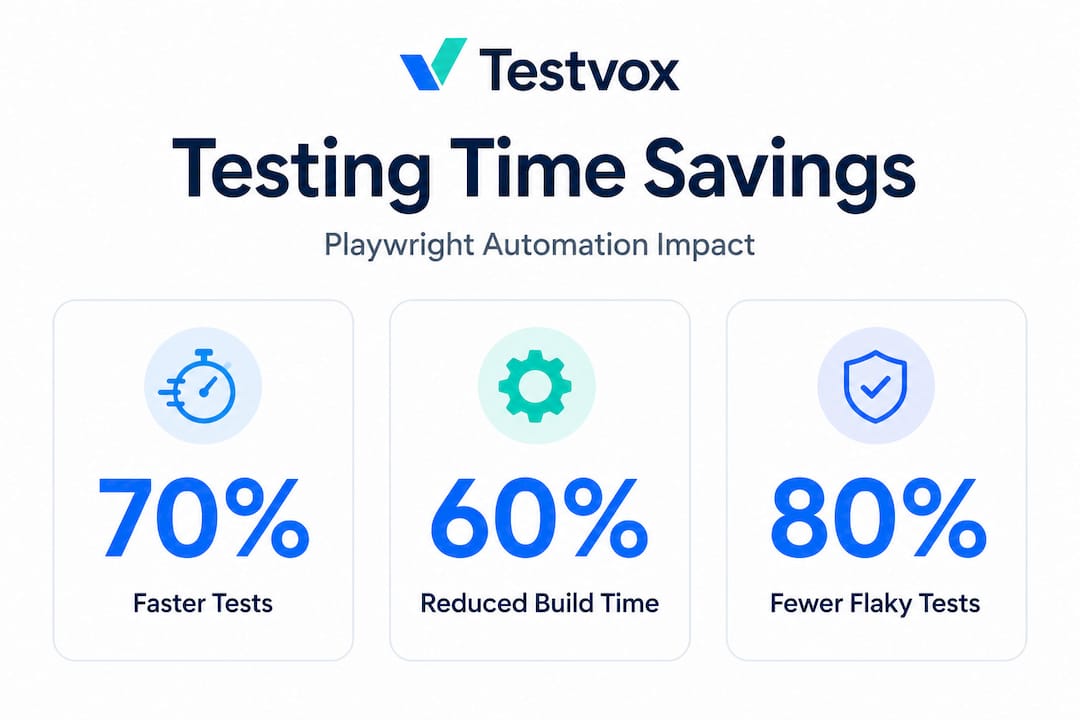
| 70% faster test cycles | Playwright’s parallel execution can reduce testing time by up to 70% for startups. |
| Cut debugging effort | AI-enhanced Playwright features shrink flaky tests and save valuable debugging hours. |
| Quick wins from migration | Migrating to Playwright can immediately drop build times for complex test suites. |
| Practical setup matters | Configuring Playwright properly and using its advanced features is key to maximizing gains. |
Testing debt accumulates quietly. A startup ships fast in its early stages, running light manual checks. Then the product grows, payment flows get complex, and the test suite balloons into something no single engineer can manage before a release. By the time you realize the problem, QA is holding up your sprints by two to three days every cycle.
Manual testing is the first culprit. A tester clicking through checkout flows, KYC screens, and dashboard widgets is not just slow, it is inconsistent. Human attention drifts. Edge cases get skipped under deadline pressure. For fintech startups handling real money and personal data, that inconsistency is a liability. For e-commerce companies managing flash sales and high-traffic events, it is a competitive risk.
The less obvious bottleneck is poorly configured test automation. Many teams adopt a testing framework, write a few hundred tests, and run them sequentially in their CI/CD pipeline. Sequential execution means each test waits for the previous one to finish. With 300 tests averaging 30 seconds each, that is 150 minutes of waiting before you know if your build is safe to deploy.
“The real cost of slow testing is not the QA hours. It is the delayed releases, the developer context switching, and the market opportunities your competitors capture while you are waiting for a green build.”
Here are the most common testing bottlenecks that hold fintech and e-commerce startups back:
One engineering team migrated 310 E2E tests to Playwright and immediately cut build time by 60%. That is not a minor improvement. That is an extra day per week returned to the product team. If you are evaluating whether upgrading your QA strategy is worth the investment, that number answers the question.

Parallel test execution means running multiple tests at the same time across separate worker processes, rather than running them one after another. Think of it like boarding a flight: sequential execution is single-file through one door, while parallel execution is every door open at once.
Playwright was built with parallelism as a core feature, not an afterthought. Out of the box, it supports running tests across multiple workers, and the performance gains are significant. Running with 4 workers delivers 70% faster test execution compared to sequential runs. For a suite that previously took 150 minutes, that drops to roughly 45 minutes. Enable 8 workers in a CI environment with enough compute, and you cut it further still.
| Metric | Sequential execution | Parallel execution (4 workers) |
|---|---|---|
| 300-test suite duration | ~150 minutes | ~45 minutes |
| CI/CD pipeline block time | High | Low |
| Resource usage | Single core | Multi-core |
| Flaky test isolation | Difficult | Easier per worker |
| Setup complexity | Low | Moderate |
The configuration is straightforward. In your "playwright.config.tsfile, you setworkers: 4` (or higher depending on your CI environment) and Playwright distributes tests across those processes automatically. You do not need to redesign your test architecture to take advantage of this. Most teams can enable parallel execution within a single afternoon.
Key statistic: Teams using Playwright’s parallel execution with 4 or more workers report test suite durations dropping from hours to under an hour, with some reporting reductions well beyond 70% when combined with other optimizations.
Pro Tip: Start with workers: 2 in your local environment to validate parallel stability before pushing workers: 4 or higher to your CI pipeline. Some tests that share global state may need minor refactoring before they run cleanly in parallel.
Parallel execution also pairs well with outsourcing automation for scalability. When a specialist team sets up your Playwright configuration correctly from the start, you avoid the two most common parallel execution mistakes: shared state collisions and worker resource exhaustion. Knowing the essential Playwright features before scaling saves significant rework time.
Parallel execution is Playwright’s most visible speed lever. But two advanced features, storageState and AI-enhanced automation, are where the real depth of the framework shows up.
Login is the silent runtime killer in E2E test suites. If every single test navigates to your login page, enters credentials, waits for authentication, and then proceeds to the actual test scenario, you are wasting minutes per test. Multiply that across 300 tests and you have added hours to every pipeline run.
Playwright’s storageState feature solves this cleanly. You authenticate once, save the browser session state (cookies, local storage, session tokens) to a file, and then load that saved state at the start of each test. The test starts already logged in. No credentials. No wait time. No repeated API calls to your auth server.
Using storageState brought one team’s E2E runtime from 15 minutes down to 3 minutes. That is an 80% reduction from a single configuration change. For fintech apps with multi-factor authentication flows or e-commerce platforms with complex session management, this is transformational.
Implementation follows a clear sequence:
page.context().storageState({ path: 'auth.json' })auth.json file in your playwright.config.ts under storageStateFlaky tests are the tax nobody budgets for. A test that fails 20% of the time is not a minor nuisance. It erodes trust in your entire test suite. Engineers start ignoring red builds. QA re-runs suites multiple times to confirm real failures. Debugging sessions eat hours that should go to feature work.
AI-enhanced Playwright integrates machine learning-powered locator strategies and dynamic wait mechanisms that adapt to UI changes and timing variations. The results are concrete. AI-enhanced Playwright automation cut flaky test rates by 70% in documented implementations. Teams report spending far less time investigating false positives and far more time shipping features.
| Feature | Before | After |
|---|---|---|
| Test runtime (storageState) | 15 minutes | 3 minutes |
| Flaky test rate (AI-enhanced) | Baseline | 70% reduction |
| Debugging sessions per sprint | High | Significantly lower |
| Engineer confidence in CI results | Low | High |
Pro Tip: Pair storageState with parallel execution and you get a compounding effect. Faster per-test setup plus concurrent runs means your full suite can complete in a fraction of its original time, without sacrificing reliability.
For teams ready to implement these features properly, reviewing a step-by-step Playwright automation guide prevents the configuration mistakes that cancel out these gains. Studying how others handled optimizing Playwright frameworks gives you a realistic picture of what the implementation journey looks like.
Having the right tools is only half the equation. How you configure and operate Playwright determines whether you capture those 70% time savings or leave them on the table.
Start with a migration plan, not a rewrite. If you have an existing Cypress or Selenium suite, do not throw it away. Playwright’s tooling supports incremental migration. Move your highest-value tests first, specifically your critical payment flows, user registration journeys, and core e-commerce checkout sequences. These are the tests that, if they fail in production, cost you real money. Getting those right in Playwright first proves the value before you commit the full engineering effort.
Here are the essential practices that separate high-performing Playwright setups from average ones:
For fintech applications, focus your Playwright suite on transaction confirmation flows, session timeout behavior, and payment gateway error states. For e-commerce, prioritize cart persistence across sessions, coupon application logic, and checkout abandonment scenarios. Real-world cross-browser Playwright testing strategies for startups address exactly these scenarios in practical depth.
One team that reduced build time by 60% across 310 E2E tests did so by combining migration planning with early parallel execution enablement. They did not wait for a perfect setup. They moved fast, validated, and iterated.
Here is the uncomfortable observation from working with dozens of fintech and e-commerce teams: most startups that adopt Playwright still run their tests sequentially. They install the framework, write great tests, and then leave workers: 1 in the config because nobody changed the default. They capture maybe 20% of the available speed improvement and then wonder why QA is still a bottleneck.
The second most common failure is overcomplexity at the start. Teams build elaborate test infrastructure with custom reporters, complex fixture chains, and sophisticated retry logic before they have proven their core test suite works reliably. When things break, and they will, debugging is exponentially harder. The advice here is blunt: get 50 stable, parallel tests running before you add any abstraction layer.
There is also a cultural problem worth naming. Many engineering leads treat Playwright as a developer tool and keep QA engineers out of the configuration decisions. The result is a technically correct setup that does not reflect the actual test scenarios QA needs to cover. The 70% time savings only materialize when the framework is configured for your specific application’s behavior, not for a generic E2E testing template.
Working with expert test engineers who have implemented Playwright for fintech and e-commerce applications specifically means you skip the six weeks of trial and error that most teams go through. The configuration decisions that feel minor, worker counts, retry strategies, storageState scope, browser matrix, collectively determine whether your suite runs in 40 minutes or 4 hours.
Start small. Enable parallel execution on day one. Add storageState before your suite grows past 50 tests. Review flaky test reports every sprint. These three habits, consistently applied, will deliver more speed improvement than any advanced feature added later.
Knowing what Playwright can deliver is one thing. Building and maintaining a high-performance Playwright setup while running a product roadmap is another. That is where a specialist partner changes the equation.
Testvox works with fintech and e-commerce startups in India and the UAE to design, implement, and optimize Playwright automation frameworks that actually hit those 70% speed targets. From configuring parallel execution correctly to implementing storageState and AI-enhanced test strategies, the team brings hands-on experience that shortens your path to reliable, fast QA. Browse real results in e-commerce testing case studies and fintech testing case studies to see what this looks like in practice. When you are ready to scale, scalable QA outsourcing lets you move fast without hiring a full internal QA team.
Playwright automation can reduce testing and build times by up to 70% with parallel execution, and migrations from older frameworks like Cypress or Selenium typically show 60% or greater build time reductions based on documented real-world cases.
Yes, Playwright is especially effective for complex fintech and e-commerce applications where cross-browser reliability, authentication flow testing, and fast CI feedback are business-critical requirements that directly affect revenue and compliance.
AI-enhanced Playwright automation reduces flaky tests by 70%, and storageState eliminates repetitive login overhead, both of which dramatically shrink the time engineers spend investigating false test failures.
No, Playwright’s built-in parallel execution, automatic retry logic, and detailed reporting make it practical for small QA teams or even individual engineers to manage large test suites efficiently.
Startups can see major improvements almost immediately after migration. One team achieved 60% faster builds across 310 E2E tests within a single quarter of migrating to Playwright with parallel execution enabled.

Let us know what you’re looking for, and we’ll connect you with a Testvox expert who can offer more information about our solutions and answer any questions you might have?
