




UAE
Testvox FZCO
Fifth Floor 9WC Dubai Airport Freezone
 BY
Testvox
BY
Testvox
A failed payment flow at checkout. An exposed API endpoint leaking customer financial data. A session bug that lets one user peek at another’s transaction history. These aren’t hypothetical nightmares; they’re the real consequences of shipping without reliable, security-conscious test automation in fintech and e-commerce. Manual testing and patchwork automation can’t keep up with the velocity modern development demands. Playwright, Microsoft’s open-source browser automation framework, offers a fundamentally different approach: stable, cross-browser, end-to-end testing with built-in synchronization and first-class developer tooling that scales with your product.
| Point | Details |
|---|---|
| Optimize for reliability first | Use Playwright’s auto-waiting and web assertions to create tests that are less flaky and more maintainable. |
| Integrate security checks early | Embed security and access-control tests into end-to-end flows from day one, especially for fintech and e-commerce platforms. |
| Use diagnostics wisely | Leverage Playwright tracing selectively during CI retries or failures for actionable debugging without slowing builds. |
| Think systemically | Tune your test infrastructure and practices before expanding coverage to ensure scalable, actionable outcomes. |
| Pair with DAST tools | Combine Playwright with tools like OWASP ZAP for broader web security assurance during CI/CD. |
Before you spin up your first Playwright test suite, you need an honest inventory of your team and infrastructure. Jumping straight into automation without this assessment is one of the costliest mistakes fintech and e-commerce teams make. You end up with a flaky, unmaintainable suite that engineers dread touching.
Team skill set matters more than tooling. Playwright tests are written in JavaScript, TypeScript, Python, Java, or C#. Most modern teams default to TypeScript because it catches type errors early, and that choice pays dividends in a codebase that handles payment logic or user authentication. Your QA engineers need at minimum a working understanding of async/await patterns, DOM interaction, and basic CI configuration. If your team is still writing automation in a record-and-playback style, plan a short upskilling sprint before you scale.
Infrastructure and browser matrix. Playwright supports Chromium, Firefox, and WebKit out of the box. For fintech and e-commerce, your browser matrix should reflect your actual user base. If 60% of your customers use mobile Safari, WebKit coverage is non-negotiable. Confirm that your CI environment (GitHub Actions, GitLab CI, CircleCI, or a self-hosted runner) supports running headless browsers and has enough memory to parallelize tests without OOM crashes.
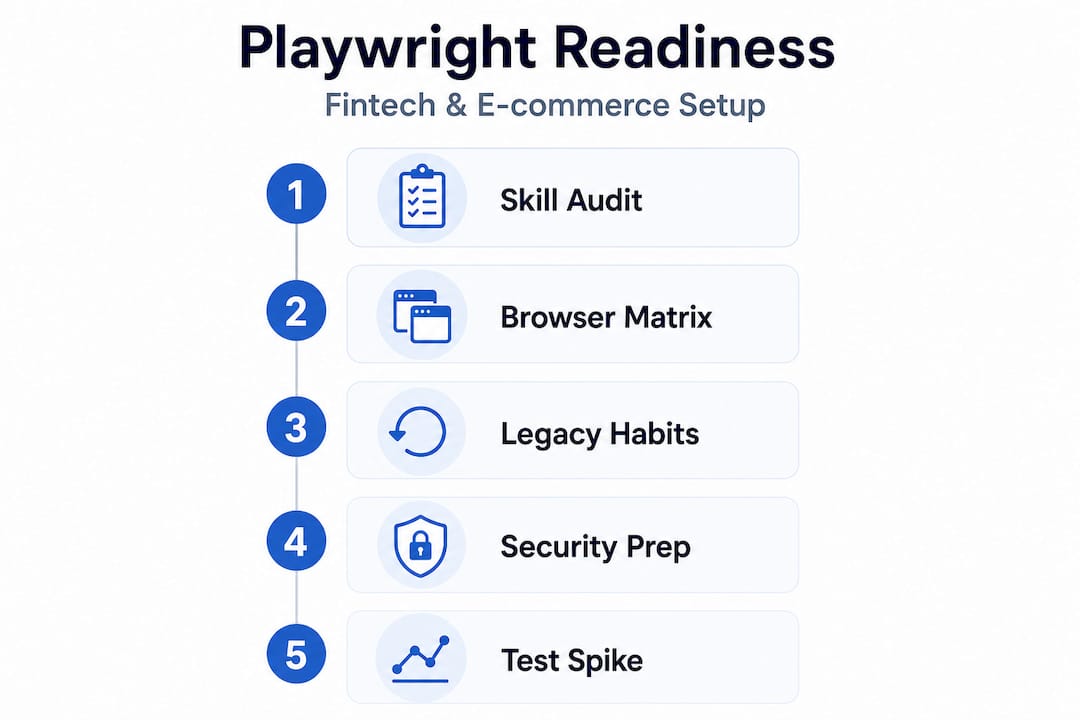
The single biggest readiness trap is carrying legacy testing habits into a modern framework. Teams frequently paste Selenium-style "sleep()` calls or fixed timeouts into Playwright tests, then wonder why their suite is flaky. The solution is to understand how must-have Playwright features actually work before writing a single test. Playwright’s auto-waiting model means tests should rely on its actionability checks and web-first assertions rather than hard-coded waits or timeouts to reduce flakiness. This is not just a stylistic preference. It is the architectural foundation that separates a reliable suite from a flaky one.
| Readiness factor | Green signal | Red flag |
|---|---|---|
| Team language skill | TypeScript/JS fluency | No prior async experience |
| CI environment | Headless browser support | Local-only test runs |
| Existing test habits | API-level assertions | Hard-coded sleep() calls |
| Browser coverage | Matches real user analytics | Chromium only |
| Compliance requirements | Defined and documented | Unknown or ignored |
Pro Tip: Run a one-day spike where a senior engineer writes five representative tests for your most critical flows. This surfaces team skill gaps and infrastructure blockers before they become blockers at scale.
With your readiness assessment done, the actual configuration phase is where precision pays off. A well-structured setup prevents the kind of accumulating technical debt that forces rewrites six months later.
Initialize your Playwright project correctly. Run npm init playwright@latest and choose TypeScript. Immediately configure your playwright.config.ts to define named projects for each browser and device viewport you need. Do not leave everything in the default config; fintech and e-commerce flows have complex state and session requirements that need explicit project-level settings.
Structure your test suites around business flows, not pages. A payment gateway test suite should mirror the user journey: authentication, product selection, cart management, checkout, payment processing, and confirmation. Each suite becomes a living specification of critical business functionality. This structure makes it immediately obvious when a regression breaks a revenue-impacting flow.
Leverage auto-wait and web-first assertions throughout. Instead of await page.waitForTimeout(3000), use await expect(page.locator('[data-testid="payment-success"]')).toBeVisible(). Playwright waits for the element to meet the assertion condition before proceeding. This eliminates a whole class of timing bugs.
Integrate with CI from day one. Add a playwright.yml GitHub Actions workflow or equivalent that runs on every pull request. The critical configuration detail here: set use: { trace: 'on-first-retry' } in your Playwright config. This means traces are only captured when a test fails and retries, keeping storage overhead low while ensuring you always have diagnostic data when something breaks. As noted in Microsoft’s Playwright engineering blog, Playwright tracing and the Trace Viewer are first-class observability tools for debugging CI failures. You can also review a detailed step-by-step Playwright guide to avoid common setup mistakes.
Configure parallelization thoughtfully. Playwright runs tests in parallel by default across files. For a fintech app with shared database state, you need to isolate test data per worker or use isolated storage states. Set fullyParallel: false at the suite level for stateful flows and rely on parallel file-level execution for stateless checks.
| Configuration setting | Recommended value (fintech/e-commerce) | Why it matters |
|---|---|---|
retries |
1 in CI, 0 locally | Captures traces; avoids masking real failures |
trace |
'on-first-retry' |
Diagnostic coverage without storage bloat |
workers |
50% of available CPU cores | Balance speed vs. stability |
timeout |
30,000ms per action | Accommodates real payment API latency |
screenshot |
'only-on-failure' |
Visual evidence without noise |
Understanding Playwright’s future in QA helps contextualize why investing in this configuration work now produces long-term returns as your platform scales.
Pro Tip: Use storageState to pre-authenticate test users once per worker setup, then reuse the stored session across tests. This alone can cut your suite runtime by 30 to 40 percent on auth-heavy applications.
Functional automation is table stakes. What separates mature fintech and e-commerce QA from the rest is embedding security validation directly into end-to-end flows. If you’re waiting for a separate penetration testing cycle to catch authorization bugs, you’re already too late in the release cycle.

Role-based access control (RBAC) regression. Write explicit Playwright tests that log in as a lower-privilege user (such as a standard account holder) and then attempt to access admin-only endpoints, other users’ transaction histories, or configuration pages. These tests should assert HTTP 403 responses or UI redirects, not just that the element isn’t visible. Visibility checks can be fooled; proper HTTP-level validation cannot.
Session isolation checks. In multi-tenant fintech platforms, session bleed is a critical vulnerability. Your automation suite should include tests that create two isolated browser contexts with different authenticated users and verify that user A cannot access user B’s data through any predictable URL pattern or API call.
Transaction visibility and data exposure. E-commerce platforms regularly expose order IDs in URLs. Write tests that enumerate adjacent order IDs and assert that a logged-in user cannot access another customer’s order details. This is IDOR (Insecure Direct Object Reference) testing, and security regression checks integrated into end-to-end flows are especially valuable for authentication and access control in fintech and e-commerce contexts.
Security tests in Playwright work best when they are treated as first-class citizens of your regression suite, run on every PR alongside functional tests, and scoped to the highest-risk flows: authentication, authorization, session management, and payment processing.
Pairing Playwright with OWASP ZAP. Playwright alone is excellent for scripted security checks, but it doesn’t simulate the full range of attack patterns. Pair your Playwright suite with automating OWASP ZAP in CI/CD for dynamic application security testing (DAST). The workflow looks like this: Playwright handles authenticated, scripted flows to reach deep application states that an unauthenticated scanner can’t reach; OWASP ZAP then proxies those requests and runs attack-pattern analysis. This combination provides coverage that neither tool delivers alone. Your cross-browser Playwright setup should also account for security behavior differences across browser engines, since certain CSP (Content Security Policy) enforcement and cookie handling varies between Chromium and WebKit.
Risk-based security regression testing should focus on authentication, access control, and session handling for high-risk fintech flows, then pair with DAST tools for broader attack-style validation. This scoping prevents your security test suite from becoming a maintenance burden while still covering the flows that matter most for compliance.
Pro Tip: Create a dedicated Playwright project named security-regression in your config that runs only the RBAC, session isolation, and data exposure tests. Tag these tests and run them as a blocking gate on every release branch, not just main.
Even a well-configured suite develops reliability issues as your application evolves. The goal is not zero failures, but fast, accurate root cause identification and systematic reduction of genuine flakiness.
Distinguishing real flakiness from systemic failures. A test that fails one in ten runs is flaky. A test that fails consistently after a specific code change is a regression. Engineers often conflate the two, reaching for retries as a band-aid. Retries mask nondeterminism and should be used to obtain diagnostics rather than to hide systemic issues. Set retries to 1 in CI specifically to trigger trace capture, then investigate every retry event rather than ignoring it.
Using CI trace artifacts for root cause analysis. When a test fails and retries, Playwright captures a trace.zip file containing a full timeline of browser actions, network requests, console logs, and DOM snapshots. Download this artifact and open it in the Playwright Trace Viewer (npx playwright show-trace trace.zip). You can pinpoint the exact moment and reason for failure, whether it’s a slow API response, a DOM change, or a race condition. Playwright’s CLI trace inspection capabilities make it possible to analyze trace files without a GUI, which is useful in automated reporting pipelines.
Practical optimization steps:
--shard=1/4 style arguments to reduce total pipeline timedata-testid attributes over CSS classes or XPath expressions that break with UI refactoringpage.pause() locally during development to step through failing tests interactively before investing time in trace analysisPro Tip: Track your ten slowest tests every sprint using Playwright’s built-in reporter output. Fixing the slowest tests through better locators or state setup often reduces overall suite time more than any infrastructure change.
For teams scaling beyond a single squad, scaling Playwright QA requires thinking about test ownership, shared fixture libraries, and parallelization strategy at the organization level. A real-world example of this kind of tuning is documented in a Playwright optimization case study that demonstrates how infrastructure and synchronization improvements compound over time.
Most Playwright guides focus on getting tests to run. Very few address what happens after you have 500 tests and a 40-minute CI pipeline that your engineers have started ignoring because it’s “always flaky.”
Here’s the perspective shift that changes outcomes: treat your Playwright automation as a reliability engineering system, not a test coverage checklist. That means measuring flake rate, execution time, and trace utilization as primary metrics, then tuning infrastructure (parallelism and sharding) and synchronization (auto-wait with precise assertions) before adding more test surface area.
The instinct to add more tests is understandable. Coverage feels like progress. But in practice, a suite with 200 highly reliable, well-maintained tests provides more business value than 800 tests where 30% are known to be flaky and ignored. Flaky tests are not just a technical problem; they erode trust in the entire QA signal. When engineers stop trusting the suite, they stop acting on its failures, and that’s when real bugs ship to production.
For fintech and e-commerce specifically, the stakes amplify this effect. A flaky authentication test that gets retried and passes may be masking a genuine intermittent session bug that will eventually surface in production at the worst possible time, during a high-traffic sale event or a regulatory audit period.
The sustainable path is to invest in advanced Playwright QA strategies that emphasize diagnostic infrastructure first, then expand coverage deliberately, aligned to actual risk and business impact. This is the approach that lets your QA capability scale with your company rather than becoming a liability.
Building reliable, security-conscious Playwright automation for fintech or e-commerce is genuinely complex work. The difference between a suite that gives you confidence and one that your team ignores often comes down to architecture decisions made in the first few weeks.
At Testvox, we’ve designed our QA services specifically for fintech and e-commerce teams that need more than a generic testing approach. Whether you need a complete fintech application testing services engagement or a targeted review using our e-commerce test checklist, our team brings deep Playwright expertise alongside VAPT security validation aligned to OWASP standards. We work as an extension of your engineering team, not a bottleneck, so you ship faster with confidence.
Playwright’s auto-waiting and web-first assertions reduce flakiness compared to Selenium’s manual wait model, making tests significantly more stable without requiring engineers to tune timeouts manually.
Capture Playwright traces on the first test retry and use the Trace Viewer or CLI to analyze the full failure timeline. As documented by Microsoft’s Playwright team, tracing and the Trace Viewer are first-class observability tools for CI debugging.
By writing explicit tests for RBAC, session isolation, and data exposure, and pairing them with DAST scans, you embed security regression checks directly into your release pipeline rather than treating security as a post-launch activity.
No. Capture traces selectively, on first retry or only on failure, to balance diagnostic value against storage and upload overhead. Running traces on every test in a large suite creates unnecessary CI costs without proportional diagnostic benefit.

Let us know what you’re looking for, and we’ll connect you with a Testvox expert who can offer more information about our solutions and answer any questions you might have?
