
 8 January 2026

Playwright is the future of test automation in 2026
7 May 2026
 8 min 59 sec
  BY
Amju
BY
Amju
Selenium shaped a decade of test automation, and many teams still swear by it. But for startups and SMEs shipping modern web apps at speed, its limitations are no longer just inconvenient — they are actively slowing releases and inflating QA costs. Playwright, Microsoft’s open-source automation framework, directly addresses the biggest pain points: timing-related failures, opaque debugging, and fragile test suites. Auto-waiting reduces flakiness by waiting for elements to be truly ready before acting, eliminating the guesswork that plagues Selenium-based pipelines. This article gives CTOs and founders a research-backed, practical view of why Playwright deserves serious consideration in 2026.
Table of Contents
- Rethinking test automation: Why Selenium’s legacy is fading
- Playwright: The key innovations powering the future
- Playwright vs. Selenium: Real-world performance and reliability
- Applying Playwright: Best practices for high-impact automation
- The uncomfortable truth about test automation: Why most teams underuse Playwright’s strengths
- Supercharge your QA strategy with Playwright experts
- Frequently asked questions
Key Takeaways
| Point | Details |
|---|---|
| Flakiness reduction | Playwright’s auto-waiting model tackles timing-related failures and delivers more stable tests than legacy tools. |
| Accelerated debugging | Trace Viewer and built-in reporting let teams quickly pinpoint and fix test issues with visual clarity. |
| Faster test execution | Benchmarks show Playwright often runs tests much faster than Selenium, especially for modern web apps. |
| Strategic migration | Disciplined migration from Selenium to Playwright helps avoid destabilized test suites and maximizes benefits. |
| Future-ready automation | Playwright’s integrated features make it the top choice for CTOs and founders seeking high-impact test automation. |
Rethinking test automation: Why Selenium’s legacy is fading
Selenium became the default choice for browser automation because it was first. It offered cross-browser support at a time when no real alternatives existed, and a massive community built up around it. For years, that community advantage was enough to overlook the rough edges. But the web has changed dramatically, and Selenium has not kept pace.
Modern web apps are built on JavaScript-heavy single-page application (SPA) frameworks. Elements load asynchronously, states change in milliseconds, and interactions depend on complex event chains. Selenium’s threading model and synchronous execution style were never designed for this. Teams compensate by adding explicit waits, sleep commands, and retry logic, which adds fragility rather than removing it. Every workaround is technical debt that compounds over time.
The frustrations are predictable and consistent across teams:
- Flaky tests that pass locally but fail in CI, making it impossible to trust your pipeline
- Slow execution caused by sequential test runs and browser startup overhead
- Limited debugging that leaves engineers staring at a stack trace with no context about what the browser actually did
- Brittle locators that break when developers update class names or restructure the DOM
- High maintenance overhead as test suites grow and the team spends more time fixing tests than writing new ones
Benchmarks show Playwright outpaces Selenium on both speed and flakiness, though results are app-dependent. The gap is most pronounced for modern JavaScript applications where asynchronous behavior is the norm rather than the exception.
“The real cost of flaky tests is not the failed run. It is the engineer-hours spent investigating failures that turn out to be timing issues, not actual bugs.”
If your team is investing significant time managing test instability rather than expanding coverage, that is a signal worth taking seriously. The move toward modern JS automation frameworks is not hype. It reflects a genuine shift in what the web demands from automation tooling.
Playwright: The key innovations powering the future
Playwright was built with modern web architecture in mind from day one. It does not try to retrofit old patterns onto new problems. The result is a set of features that feel genuinely different from what Selenium offers, not just marginally improved.
Here are the core innovations that matter most for your team:
- Auto-waiting and actionability checks. Before Playwright interacts with any element, it verifies that the element is visible, stable, enabled, and not obscured. This auto-waiting model eliminates the need for manual sleep commands or explicit wait chains. Your tests interact with elements when they are actually ready, not when an arbitrary timer expires.
- Trace Viewer for deep debugging. When a test fails, Playwright can capture a full execution trace that includes screenshots at every step, DOM snapshots, network requests, and console logs. The Trace Viewer lets you replay the exact sequence of events that led to a failure, turning a frustrating debugging session into a straightforward root-cause analysis.
- Parallel execution by default. Playwright runs tests in parallel across multiple browser contexts without the configuration overhead Selenium requires. This directly reduces total suite execution time, which matters enormously for teams running tests in CI on every pull request.
- Multi-browser and multi-context support. Playwright supports Chromium, Firefox, and WebKit natively. You can run tests across all three browsers in a single command, and you can open multiple browser contexts within a single test to simulate multi-user scenarios like real-time collaboration or concurrent transactions.
- Built-in reporting. Playwright ships with an HTML reporter that aggregates results, embeds trace artifacts, and provides a navigable view of your test run. No third-party integration required to get meaningful output from your pipeline.
- Network interception and mocking. Playwright lets you intercept and modify network requests at the test level. This is invaluable for testing edge cases like API timeouts, error responses, and payment gateway failures without relying on external services.
The practical impact of these features compounds quickly. Teams that adopt must-have Playwright features report fewer reruns, faster root-cause analysis, and higher confidence in their CI pipelines. The debugging improvement alone can reclaim hours per sprint for engineering teams.
Pro Tip:
Configure Playwright’s trace retention to “retain-on-failure` in your CI environment. This means traces are only stored when a test fails, keeping storage costs low while ensuring you always have the data you need to investigate real failures.

Playwright vs. Selenium: Real-world performance and reliability
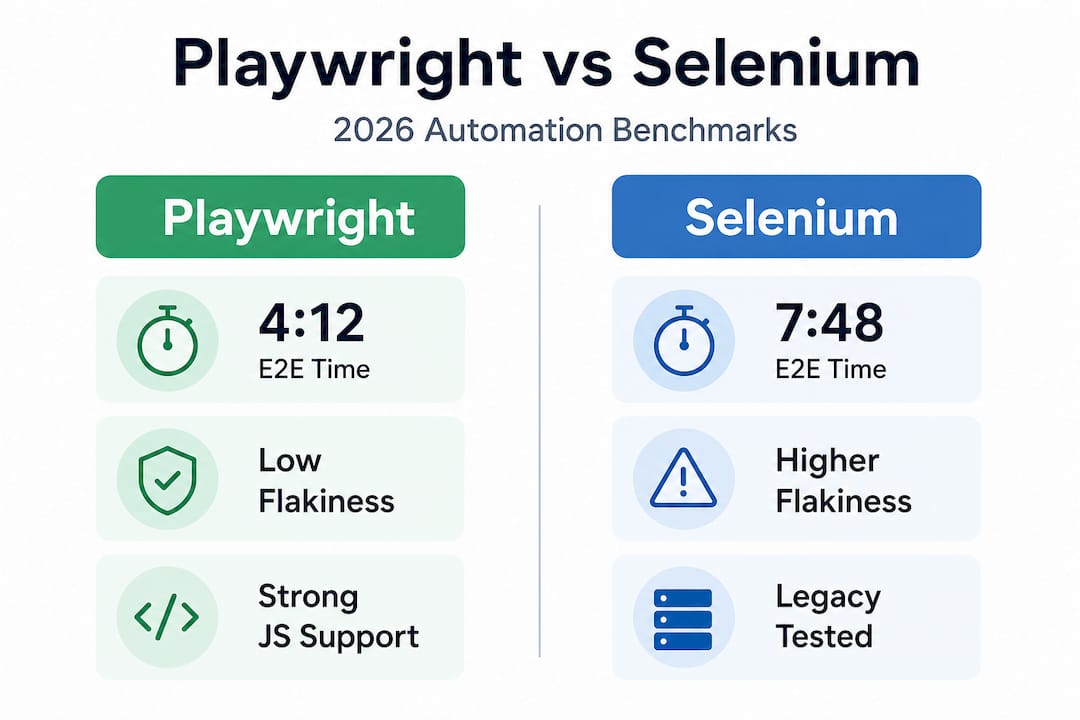
Concrete numbers help cut through the noise. In a documented benchmark comparing end-to-end test suites on a modern JavaScript SPA, Playwright completed tests in 4:12 versus Selenium’s 7:48, with meaningfully lower flakiness rates across repeated runs. That is nearly half the execution time for the same coverage.
| Metric | Playwright | Selenium |
|---|---|---|
| E2E suite execution time (SPA) | 4 min 12 sec | 7 min 48 sec |
| Flakiness rate (async-heavy apps) | Low | High |
| Built-in parallel execution | Yes | Limited |
| Native trace and debugging | Yes | No |
| Multi-browser support | Chromium, Firefox, WebKit | Chromium, Firefox, Edge |
| Network interception | Built-in | Requires third-party tools |
| Setup complexity | Low | Medium to high |
The performance gap is most pronounced in three specific scenarios. First, JavaScript-heavy SPAs where asynchronous rendering is constant. Second, test suites with high parallelism requirements where Playwright’s architecture shines. Third, CI environments where execution time directly affects deployment frequency and developer feedback loops.
Where Selenium still holds ground is in legacy application testing, particularly server-rendered apps with minimal JavaScript. If your stack is a traditional multi-page application with predictable DOM behavior, the urgency to migrate is lower. But for fintech dashboards, e-commerce storefronts, and SaaS platforms with rich client-side logic, the case for Playwright is compelling.
The key insight is that tool selection should follow your application architecture. Playwright’s edge is real, but it is most valuable when your app actually demands what Playwright is designed to handle. Reducing test suite time with Playwright is achievable, but it requires matching the tool to the problem.
Applying Playwright: Best practices for high-impact automation
Knowing Playwright’s advantages is one thing. Deploying it effectively in a real team with existing processes is another. Here is a practical framework for making the transition work.
Migration steps that minimize disruption:
- Start with new test coverage rather than immediately rewriting existing Selenium tests. This lets your team learn Playwright’s patterns without risking regression in your current suite.
- Identify the highest-value, highest-flakiness tests in your Selenium suite and migrate those first. You get the biggest stability gains immediately while limiting the scope of change.
- Run Playwright and Selenium suites in parallel during the transition period. This gives you a safety net and lets you validate that coverage is maintained.
- Establish coding standards for Playwright early, including locator strategies, page object structure, and trace configuration. Consistency prevents the same technical debt you accumulated with Selenium.
Trace retention strategies and their business impact:
| Trace strategy | When to use | Business impact |
|---|---|---|
retain-on-failure |
CI pipelines, standard runs | Low storage cost, full debug data on failures |
on (always capture) |
Flaky test investigation | High storage, maximum visibility |
off |
Stable, well-understood suites | Minimal overhead, no debug data |
Playwright’s tracing configuration supports multiple strategies for flaky tests and debugging, including retain-on-failure for retries. This flexibility means you can tune your trace behavior to match the maturity and stability of different parts of your test suite.
For CI visibility and compliance, Playwright’s built-in HTML reporter integrates trace artifacts directly into test results. This is particularly valuable for fintech and e-commerce teams that need audit trails and reproducible evidence of test coverage for regulatory or stakeholder reporting.
Pro Tip: Sequence your migration to Playwright by test priority, not by test age. Migrate the tests that gate your most critical user flows first. This builds team confidence in Playwright quickly and delivers immediate value to your release pipeline.
For teams ready to go deeper, a step-by-step Playwright guide can accelerate the learning curve significantly. And if you are reassessing your broader QA approach, upgrading your QA strategy with Playwright as the foundation is worth planning deliberately.
The uncomfortable truth about test automation: Why most teams underuse Playwright’s strengths
Here is what we see consistently when teams adopt Playwright: they install it, run their first tests, and then proceed to use it exactly like Selenium. They write explicit waits because that is what they know. Ignore the Trace Viewer because they have not built the habit of using it. They treat the HTML reporter as a nice-to-have rather than a core part of their workflow. The result is a faster Selenium, not a genuinely better testing practice.
This is cargo-culting. Teams adopt the tool but not the philosophy behind it. Playwright’s design assumes you will trust its actionability model. The moment you add waitForTimeout(2000) to a Playwright test, you have broken that contract. You are now fighting the framework instead of working with it.
The trace integration problem runs deeper. Most teams only look at traces when a test fails in CI and someone is already frustrated. That is reactive debugging. The teams that get real value from Playwright use traces proactively during test development to verify that their tests are doing what they think they are doing. It changes how you write tests, not just how you debug them.
Reporting discipline is the third missed opportunity. Playwright’s HTML reporter is not just a results dashboard. It is a communication tool. When your QA results are visible, navigable, and linked to trace artifacts, your entire team, including product managers and stakeholders, can engage with quality data. That shifts QA from a gatekeeper function to a shared responsibility.
The real transformation migration sequencing delivers is not technical. It is cultural. Teams that succeed with Playwright invest in process adaptation, not just tool adoption. They retrain their instincts, build new habits around tracing and reporting, and treat test maintenance as a first-class engineering concern.
If you are serious about getting ROI from Playwright, look at how Testvox optimized a Playwright framework for a real client. The technical choices matter, but the process discipline matters more.
Supercharge your QA strategy with Playwright experts
Making the shift to Playwright is a strategic decision, and the difference between a smooth transition and a destabilized test suite often comes down to experience. At Testvox, we have helped startups and SMEs across India and the UAE move from fragile, slow automation pipelines to reliable, trace-driven Playwright frameworks that actually support fast releases.

Whether you need a full migration plan, help building Playwright coverage from scratch, or a review of your current automation architecture, our team brings hands-on expertise to every engagement. Explore our detailed Playwright feature guide to understand what your team should be leveraging right now. If you want to scale without hiring a full in-house QA team, our outsourced Playwright QA model gives you senior automation expertise on demand. Talk to us about where your current pipeline is losing time and confidence.
Frequently asked questions
How does Playwright reduce test flakiness compared to Selenium?
Playwright’s auto-waiting and actionability checks verify that elements are visible, stable, and interactable before executing any action, removing the timing guesswork that causes most Selenium flakiness.
Can Playwright help us debug failed CI runs faster?
Yes. Playwright’s Trace Viewer captures step-by-step replays, DOM snapshots, and network activity, so engineers can pinpoint exactly what went wrong without reproducing the failure locally.
Is Playwright’s performance always better than Selenium?
Playwright completed tests faster in documented benchmarks, but the advantage is most significant for JavaScript-heavy SPAs. Server-rendered legacy apps may see a smaller gap.
What reporting and trace options does Playwright include out of the box?
Playwright ships with an HTML reporter that integrates trace artifacts directly into test results, giving teams navigable, evidence-backed test reports without additional tooling.
How do I migrate from Selenium to Playwright without major disruptions?
Disciplined migration sequencing is essential. Start with new tests and high-flakiness candidates, run both suites in parallel during the transition, and establish Playwright coding standards before scaling coverage.
Recommended
- Playwright features every QA team needs to use now
- Outsource Playwright Automation for Scalable QA Results
- How Playwright Simplifies Cross-Browser Testing for Startups
- Upgrade Your QA Strategy with Playwright Automation
8 January 2026



ABOUT TESTVOX

Testvox is a software testing company help your product reach its full potential. Get full cycle testing for your mobile and web applications while ensuring all quality assurance standards are met... Read More
100+
Applications
Assured
Assured

5 Star Rating

5 Star Rating
“By participating in our release lifecycle, Testvox's standard QA process has helped us to launch quality products faster.”

Rima Hudaifa
Manager | Cadvil
Manager | Cadvil
