




UAE
Testvox FZCO
Fifth Floor 9WC Dubai Airport Freezone
 BY
Testvox
BY
Testvox
Nearly 90% of organizations are experimenting with generative AI in quality engineering, yet only 1 in 7 have operationalized it at scale. That gap tells you everything about where most QA teams are stuck: running pilots, not programs. The role of automation in QA has never been more important or more misunderstood. Teams assume automation is a shortcut to eliminating manual testers. It is not. Used correctly, it is the infrastructure that lets your best QA engineers stop chasing regressions and start solving real quality problems. This guide covers what actually works, what quietly breaks your pipeline, and where automation is heading next.
| Point | Details |
|---|---|
| Automation complements humans | Repetitive scripted tests belong to automation; exploratory and strategic work stays with your QA engineers. |
| Flaky tests kill trust | Suites with flakiness above 1% erode engineering confidence and should be treated as bugs, not tolerances. |
| AI is advancing fast | Agentic AI systems now autonomously design and adapt tests, shifting QA from reactive scripts to predictive validation. |
| Tooling sprawl hurts teams | Nearly 75% of teams run two or more frameworks, creating overhead that consolidation can resolve. |
| Metrics determine success | Track flakiness rate, mean time to feedback, and defect escape rate to measure automation’s real impact. |
QA automation is the practice of using software tools to execute pre-defined test cases against an application and report results without human intervention at runtime. It is not a replacement for a QA team. It is a force multiplier that frees human engineers to focus on exploratory and strategic work while machines handle the scripted, repeatable checks that would otherwise consume hours every sprint.
Manual testing still matters. Exploratory testing, usability judgment, and edge-case discovery rely on human intuition that no script can replicate. The most effective QA programs treat these two modes as partners, not competitors.
Automation is not monolithic. There are four distinct levels, each suited to different contexts:
Knowing which type fits each testing layer is what separates a sustainable automation strategy from one that collapses under its own weight.
The automation suitability varies by layer. Unit tests are the most stable and fastest to run, making them near-perfect candidates for full automation. API tests sit in the middle: deterministic, fast, and UI-independent. UI tests are the most fragile because they interact with rendered interfaces that change frequently. A healthy test pyramid keeps the bulk of automated coverage at the unit and API layers and uses UI automation selectively for critical user flows.

Integrating this into a CI/CD pipeline is where the real value appears. When you connect your test suite to DevOps automation testing, every code commit triggers a test run that provides fast, actionable feedback before a defect reaches production.
Pro Tip: If your automated tests are not blocking merges on failure, they are decorative. Build gates that enforce quality rather than report it as an afterthought.
The impact of automation on QA is concrete and measurable across five dimensions.
The productivity gain is not just about speed. It is about what your team stops doing. Automating a 200-step regression checklist does not just save two hours. It gives two hours of strategic capacity back to people whose judgment is worth far more than checkbox verification.
Pro Tip: Track defect escape rate alongside test execution speed. Fast automation that still lets bugs through is not delivering its full value.
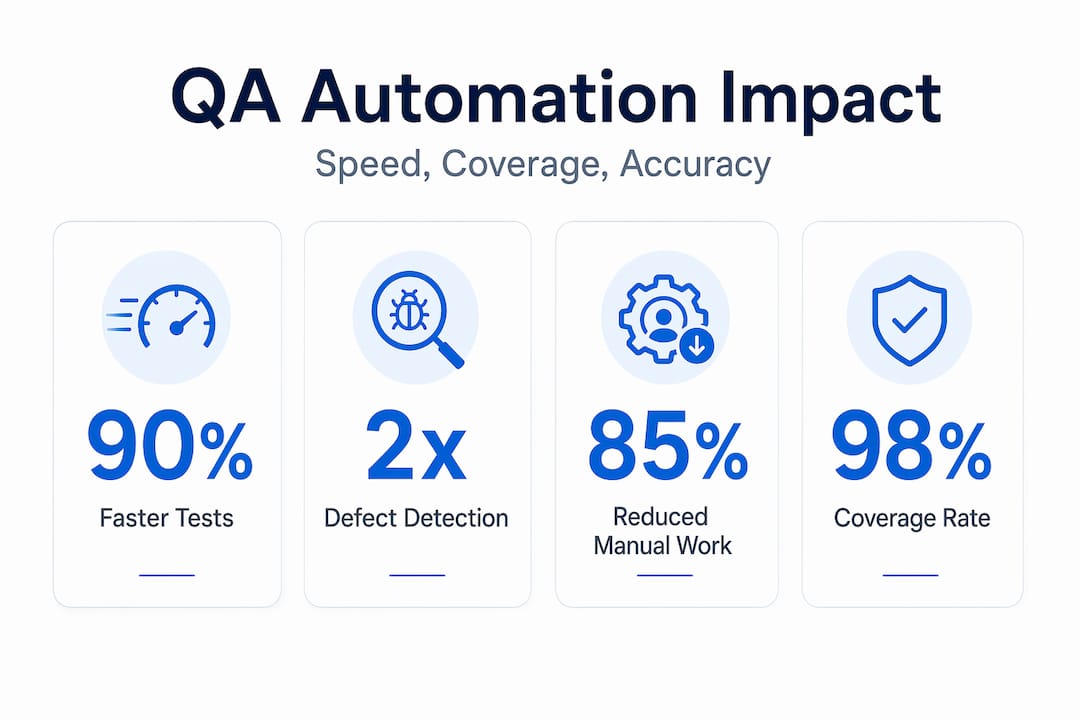
Automation’s benefits are real, but so are the ways it breaks down in practice. Understanding these failure modes is what separates teams that build durable automation from teams that rebuild their suites every six months.
Flaky tests account for 4.56% of all CI test failures, and they consume over 2% of developer coding time. That sounds manageable until you realize the secondary cost: engineers stop trusting test results. Suites above 1% flakiness erode trust. Above 5%, they become actively counterproductive because teams begin bypassing failures rather than investigating them.
The correct response to a flaky test is not to add a retry mechanism. It is to treat the flakiness as a bug, isolate the root cause, and fix it. Retries mask problems; they do not solve them.
UI tests break when a developer changes a button label or rearranges a page layout. This is the most common reason automation programs stall. The fix is a combination of stable locator strategies (preferring test IDs over XPath), page object models that centralize element references, and increasingly, self-healing tools that detect UI locator changes and update scripts automatically.
| Challenge | Impact | Mitigation |
|---|---|---|
| Multiple automation frameworks | 75% of teams run two or more, creating overhead | Consolidate to one primary framework |
| Skill fragmentation | Engineers specialize narrowly, reducing coverage | Cross-train teams on a single tool stack |
| Low-value test accumulation | Technical debt with minimal ROI | Apply risk-based prioritization to prune tests |
“Prioritize consolidating automation frameworks to avoid skills fragmentation rather than adding tools to cover gaps.” — QA Automation Trends 2026
Over-automation is a real risk. Writing automated tests for every possible scenario sounds thorough, but it produces a brittle, expensive-to-maintain suite that slows CI pipelines and demoralizes the team. The discipline of knowing what not to automate is as valuable as knowing what to automate.
The future of automation in quality assurance is not just faster scripts. It is fundamentally different in how tests are conceived, maintained, and acted upon.
Agentic AI enables systems to autonomously design, execute, and adapt tests with minimal human direction. Rather than a QA engineer writing every test case, an agentic system can analyze an application, generate test scenarios, run them, detect failures, and propose fixes. This is not a distant concept. It is shipping in 2026 across multiple automation tools for QA teams.
The practical implications are significant:
Self-healing mechanisms watch for locator failures and automatically resolve them, reducing the maintenance burden that kills most automation programs. When combined with hyperautomation, which orchestrates AI, robotic process automation, and test execution across an integrated toolchain, QA teams gain an end-to-end quality feedback system that adapts in real time.
QA has shifted from execution to intelligence, with automation now enabling predictive, risk-based testing strategies that flag likely failure zones before a single test runs. This kind of capability is also reshaping adjacent fields. The AI operationalization patterns emerging in SaaS products apply directly to how QA teams should think about scaling intelligent automation.
Pro Tip: When evaluating AI-powered QA tools, test the self-healing accuracy on your actual application, not just vendor demos. Synthetic demos rarely reflect the locator complexity of real production UIs.
Knowing the benefits and challenges of QA automation is necessary but not sufficient. Here is how to operationalize it without repeating the mistakes most teams make.
The QA automation best practices that actually hold up over time share one trait: they treat automation as living infrastructure, not a project with a completion date. Automation requires ongoing investment in maintenance, tooling evaluation, and team skill development.
I have watched organizations automate themselves into a false sense of security. They hit 80% test automation coverage, declare success, and then discover their suite is full of tests that never catch real bugs because they were written to pass, not to protect. The role of automation in QA has never been purely technical. It is a cultural question about what your team believes quality actually means.
What I have learned working across fintech and e-commerce products is that the teams with the strongest automation programs share a specific mindset. They treat every flaky test as a symptom worth investigating. They resist the temptation to add another framework when their existing one has gaps. And they never confuse test execution with quality assurance.
The emergence of agentic AI in quality engineering is genuinely exciting, but it does not change the fundamental responsibility. Human judgment still determines what quality means for a given product and user. Automation, whether scripted or agentic, is only as valuable as the quality strategy behind it. QA professionals who embrace new automation capabilities while staying grounded in that principle will thrive. Those who hand over responsibility to the tool will find out why that does not work.
The right question is not “How much can we automate?” It is “Are we automating the right things in the right way?”
— Testvox
Knowing the theory behind QA automation and actually running a reliable, scalable test program in production are two different challenges. Testvox works with startups and SMEs to close that gap, providing end-to-end testing services that span functional testing, performance audits, and AI-powered test strategy.
Whether your team is building out its first automation framework or dealing with a brittle suite that needs rebuilding from the ground up, Testvox brings structured expertise to the process. Our functional testing services cover the full scope of your application’s behavior, including payment gateway integrations and complex user flows where automation errors are most costly. We also apply automation principles to accessibility testing compliance and AI testing capabilities for products that need intelligent quality validation at scale. If you are ready to move from experimenting with automation to operationalizing it, Testvox is built for exactly that.
Automation in QA handles repetitive, scripted test execution so that human engineers can focus on exploratory testing, risk analysis, and quality strategy. It improves speed, consistency, and defect detection without replacing the judgment of skilled QA professionals.
The most damaging challenges are flaky tests, high maintenance burden from UI changes, tooling sprawl across multiple frameworks, and over-automation of low-value test cases. Each undermines the reliability and ROI of an automation program if left unaddressed.
Automated tests integrated into CI/CD pipelines run on every code commit and block merges when tests fail, catching defects minutes after introduction rather than days or weeks later. Feedback loops under five minutes have a measurable positive effect on developer productivity and code quality.
The right tool depends on your testing layer and team skills, but leading frameworks include Playwright and Selenium for UI testing, and REST Assured or Postman for API testing. AI-powered platforms are increasingly adding self-healing and agentic test generation capabilities on top of these foundations.
Agentic AI systems now autonomously design, execute, and adapt tests with minimal human input, while self-healing mechanisms reduce maintenance costs from UI changes. This shifts QA from reactive scripting toward continuous, predictive quality validation that keeps pace with rapid development cycles.

Let us know what you’re looking for, and we’ll connect you with a Testvox expert who can offer more information about our solutions and answer any questions you might have?
