
 15 June 2026

Playwright vs Cypress vs Selenium in 2026: What the Download Gap Actually Means
17 July 2026
 11:33 MIN Read time
  BY
Harshit Gupta
BY
Harshit Gupta
Last month, our team sat in on a tooling decision that had stalled for three weeks. A twelve-person product team, mid-migration off a creaky test suite, arguing in circles about which framework to standardise on. Someone had pasted a screenshot into the channel — a bar chart showing Playwright with some enormous download number next to Cypress and Selenium looking like rounding errors — and the thread underneath was forty messages of “well, that settles it” versus “downloads don’t mean anything.”
Here’s the short version because it’s the decision most teams are actually trying to make. For new web projects in 2026 we default to Playwright for browser testing, and we only walk away from it for a concrete reason: tests in a language it doesn’t bind, real mobile-device automation, or a large, healthy WebDriver suite that isn’t worth rewriting. This is a Playwright vs Cypress vs Selenium comparison built to get you to that call fast.
Both camps in that channel were half right, which is the worst kind of argument to be stuck in. The download gap is real, and it’s also one of the most over-read numbers in our industry. So before anyone picks a test automation framework off the back of a chart, it’s worth pulling the numbers apart — then talking about the things that actually decide the outcome: architecture, speed, languages, cross-browser coverage, mobile, AI agents, and cost.
What do the download numbers actually tell you?
Let’s start with the chart, because it isn’t wrong — it’s just narrow.
Pulling straight from npm’s own downloads API for the week of 2–8 July 2026: the playwright package logged about 65.4 million weekly downloads, @playwright/test another 43.9 million, cypress around 6.5 million, and selenium-webdriver roughly 1.7 million. WebDriverIO, the other WebDriver-based option people forget, sat near 2.8 million.

The direction is not in dispute. The magnitude is a trap.
Here’s why you shouldn’t headline that as “Playwright is 40x bigger than Selenium.” npm downloads count every npm install a CI runner fires on every push, every mirror, every Docker layer rebuild. They double-count Playwright, which ships as two packages most people install together.
And — this is the big one — they barely see Selenium at all, because Selenium’s centre of gravity has always been Java (Maven) and Python (PyPI), not npm. The official npm figure for the playwright package is genuine; it just measures the JavaScript ecosystem’s plumbing, not the size of the automation world.
That’s exactly why the tidy “30M vs 6.5M” number floating around blog posts should be treated with suspicion. It changes month to month, it’s already stale (Playwright’s real npm figure is well past that now), and it flatters whichever tool lives most on npm. Direction: clear — Playwright has pulled decisively ahead in the JS/TS space and Cypress has plateaued. Precise multiple: don’t put it in a slide.
The survey data tells the same story with more honesty about its own limits. In the State of JS 2024 survey — which asks people what they use at work — Playwright came back with 3,674 professional users, Cypress 3,603, and Selenium 1,130. Close race between the first two, Selenium a clear third among JavaScript developers specifically. That last qualifier matters: this survey doesn’t poll the Java and C# shops where Selenium still runs the show.
So the gap is real, the ranking is real, and the story is more interesting than “one won.” Let’s get into why a team lands where it lands.
What’s the difference between Playwright, Cypress, and Selenium?
The single most useful thing to understand is that these tools don’t just differ in syntax — they’re architecturally different animals, and the architecture decides almost everything downstream.
Three different machines under the hood
Selenium drives a real browser from the outside through the W3C WebDriver protocol. Your test talks to a driver, the driver talks to the browser over HTTP. It’s the most standards-compliant of the three and the most language-agnostic, but that out-of-process hop is also where the latency and the classic timing problems creep in.
Cypress does the opposite. It runs inside the browser’s event loop, in the same JavaScript context as your app. That’s why its debugging experience is so pleasant — time-travel snapshots, direct DOM access, no network hop. It’s also why it’s fundamentally boxed into JavaScript and struggles with anything spanning multiple tabs, origins, or a native layer.
Playwright sits in the middle by design: out-of-process like Selenium, so it isn’t trapped in one JS runtime, but talking to browsers over the fast Chrome DevTools Protocol rather than plain WebDriver, with auto-waiting baked into every action. It gets Cypress-grade ergonomics without Cypress-grade confinement.
If you remember one thing: Cypress traded reach for a beautiful in-browser experience, Selenium traded ergonomics for universal reach, and Playwright is the newest attempt to refuse that trade-off. It mostly succeeds.
Playwright vs Cypress vs Selenium: the comparison at a glance
Here’s the head-to-head we hand teams when they ask for a browser testing scorecard. Every cell is checked against the tools’ own docs and release notes (sources are listed in the meta doc that ships with this post).
| Dimension | Playwright | Cypress | Selenium |
| Architecture | Out-of-process, drives browsers over Chrome DevTools Protocol | Runs in-browser, inside the app’s JavaScript event loop | Out-of-process over the W3C WebDriver protocol (HTTP) |
| Browsers | Chromium, Firefox, WebKit bundled (v1.61: Chromium 149 / Firefox 151 / WebKit 26.5) | Chrome family, Edge, Firefox; WebKit experimental (built on Playwright’s WebKit) | Any browser with a driver — widest legacy/enterprise reach |
| Speed | Fast: CDP + parallel workers by default | Very fast per-spec on one domain (no network hop); scales via paid orchestration | Slowest per action (HTTP request/response per command); scales via Grid |
| Auto-waiting | Built in on every action | Built-in retry-ability / automatic waiting | Manual — implicit/explicit waits you write yourself |
| Language support | JS/TS, Python, Java, .NET | JavaScript / TypeScript only | Java, Python, C#, Ruby, JavaScript, Kotlin |
| Parallelism | Built-in parallel workers, free, out of the box | Parallelisation via Cypress Cloud orchestration (paid) | Selenium Grid (self-hosted infrastructure) |
| Debugging | Trace Viewer, UI mode, codegen | Time-travel snapshots, interactive runner | Basic logs; richer debugging is third-party |
| Mobile | Emulates mobile viewports/touch — no native or real-device | None | Real iOS/Android devices via Appium (WebDriver) |
| Best for | New cross-browser web testing + AI-agent workflows | JS/TS single-page-app teams who love in-browser debugging | Multi-language, legacy, and real-device/enterprise reach |
Our verdict: for greenfield cross-browser web work in 2026, Playwright is the strongest default — auto-waiting, one API across Chromium/Firefox/WebKit, free parallelism, and first-party AI agents (more on those below). Cypress is a genuinely lovely tool if your team is all-in on JavaScript, building a single-page app, and living mostly in Chromium — provided you’ve priced Cloud and accepted the experimental-WebKit asterisk. Selenium is the one you reach for on purpose: non-JS languages, real physical devices through Appium, legacy browsers, or a large existing WebDriver suite. It’s a “widest reach” choice, not a “best default” one.
Languages, cross-browser reach, and mobile
This is where a lot of “Playwright is just better” takes fall over, so let’s be precise.
Languages. Selenium wins on breadth, full stop — official bindings for Java, Python, C#, Ruby, JavaScript, and Kotlin, plus a long tail of community ports. Playwright officially supports JavaScript/TypeScript, Python, Java, and .NET — four solid ones, but no Ruby, no PHP. Cypress is JavaScript and TypeScript, and that’s the whole list. If your engineers write tests in Ruby, this decision is already made for you.
Cross-browser. Playwright bundles and drives Chromium, Firefox, and WebKit through one API — v1.61 ships Chromium 149, Firefox 151, and WebKit 26.5 as a coordinated set, so Safari-engine coverage is just another line in your config. Selenium reaches whatever has a driver, which historically includes the long tail of legacy and enterprise browsers. Cypress officially covers the Chrome family, Edge, and Firefox, with WebKit support still flagged experimental — and, tellingly, that WebKit is built on top of Playwright’s WebKit. Read that twice: Cypress’s route to Safari testing runs through Playwright.
Mobile. Here Selenium’s ecosystem still has the only grown-up answer. Real iOS and Android device automation goes through Appium, which speaks the same WebDriver protocol. Playwright can emulate mobile viewports and touch — great for responsive-layout checks, useless for testing an actual native app or a real device’s quirks. Cypress doesn’t play in this space at all. If “does it work on a physical iPhone” is a real requirement, Selenium-plus-Appium is where you live.
The honest summary is that Playwright covers the browsers 95% of teams actually care about, in the box, today. Selenium covers the last 5% you might be contractually stuck with. Cypress covers Chromium beautifully and everything else with an asterisk.


4.5/5 (200+ customers)
Which is the fastest in 2026?
“Fastest” splits into two questions, and the honest answer is different for each.
For a single spec running against one domain, Cypress often feels the fastest. It lives inside the browser’s event loop, so there’s no out-of-process network hop between your commands and the page — the feedback loop is tight and the interactive runner is genuinely quick to iterate in.
For a large suite’s wall-clock time, Playwright usually wins. It runs parallel workers across your CPU cores out of the box, with no server to stand up and no per-run bill, and the Chrome DevTools Protocol connection is lower-latency per action than WebDriver’s HTTP round-trips.
Selenium is the slowest per action, by design — every command is an HTTP request/response over the WebDriver protocol. It closes the gap at scale only when you invest in Selenium Grid to fan tests out across machines, which is infrastructure you own and operate.
We’d steer you away from the “42% faster” style numbers that circulate on vendor blogs. Real-world speed depends on your app, your network stubbing, how much you parallelise, and how flaky your waits are. The durable point: Playwright’s built-in parallelism and auto-waiting make fast, stable suites the path of least resistance, and that matters more than any single benchmark.
Which is most ready for AI agents?
This is the axis that barely existed two years ago and now quietly decides migrations.
Late in 2025, Playwright v1.56 shipped Playwright Agents — three first-party agent definitions you wire into an LLM: a Planner that explores your app and writes a Markdown test plan, a Generator that turns that plan into executable Playwright code, and a Healer that runs the suite and automatically repairs failing tests. You bootstrap them with npx playwright init-agents and point them at Copilot, Claude Code, or whatever you use.
The reason this widens the gap rather than just adding a feature is subtle. Agents work off the page’s accessibility tree — roles and names, not brittle CSS. Playwright’s auto-waiting and role-first locators hand an agent a stable, semantic model of the page.
Selenium’s manual timing and free-for-all selectors hand it a minefield, which is why self-healing on Selenium has historically meant bolting on third-party tools like Healenium rather than anything first-party. Cypress has been shipping AI-flavoured cloud features, but no equivalent open agent trio that generates and heals your local suite.
We’ve watched this play out on real teams: the more your test automation leans on AI to draft and maintain tests, the more the framework’s underlying design decides whether that AI is an asset or a liability. In 2026 that’s the strongest single reason new projects default to Playwright — not raw speed, but agent-readiness. It’s the same shift we dug into when writing about why teams keep migrating off Selenium.
What does each framework cost?
All three frameworks are free and open source. That’s not where the money is.
Selenium is free to run but expensive to operate — you stand up and babysit Selenium Grid for parallel runs, and you own the infrastructure. Playwright runs parallel workers and ships a trace viewer with no server to feed; its cost is mostly your CI minutes.
Cypress is where it gets pointed: the framework is free, but serious parallelisation and orchestration push you toward Cypress Cloud, which in 2026 runs a free Starter tier, a Team plan at $67/month (billed annually), and a Business plan at $267/month, metered on test results. None of that is outrageous, but it’s a recurring line item that Playwright and Selenium simply don’t have. Budget for it before you standardise, not after.
Which should you choose?
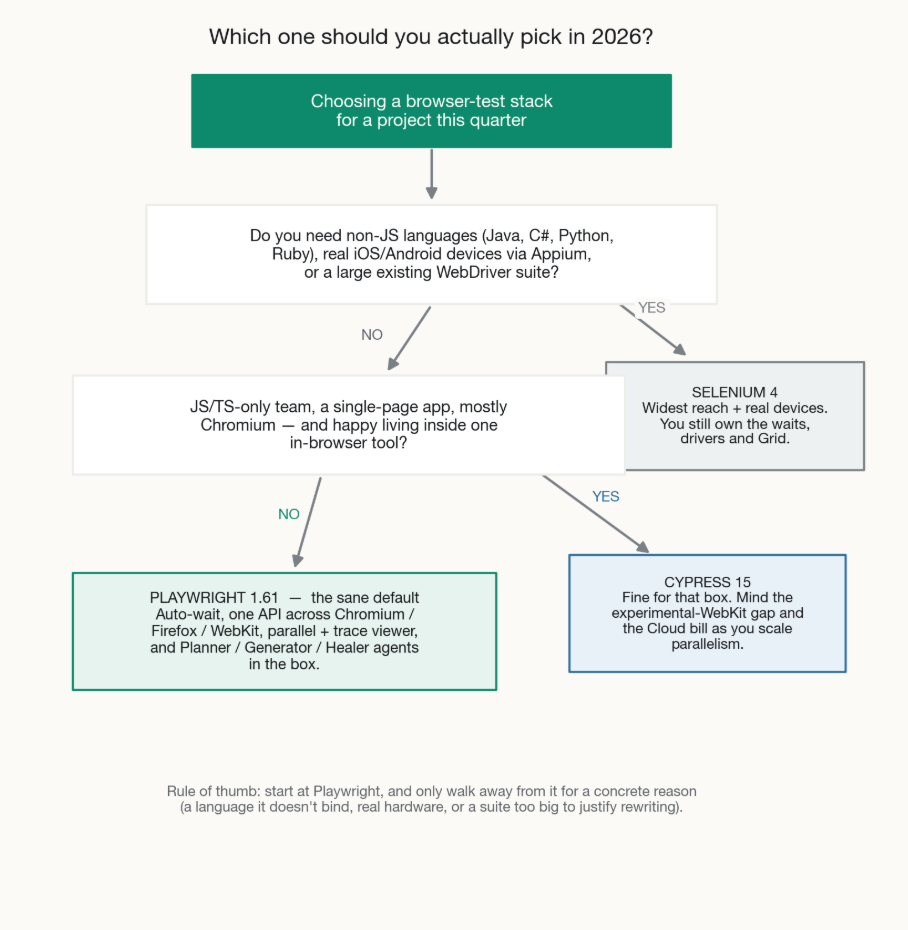
Start at Playwright and only walk away for a concrete reason. Most teams who think they need Selenium actually need Playwright plus a small, honest list of exceptions.
Our blunt take, after watching a lot of these decisions: default to Playwright. New project, JS/TS-friendly team, wants cross-browser and AI agents without operational overhead — it’s the obvious pick and it’s not close.
Reach for Selenium when you have a real constraint it uniquely solves: tests in Ruby or another language Playwright doesn’t bind, genuine physical-device automation, a legacy browser you’re contractually stuck with, or a large, stable, well-maintained WebDriver suite where a rewrite would cost more than it returns.
Cypress still earns its place for a JavaScript team building a single-page app who love the in-browser debugging loop and live mostly in Chromium — as long as they’ve priced Cloud and made peace with the WebKit asterisk.
What we’d stop doing is picking based on a download chart. The chart tells you which community is loudest on npm. It doesn’t tell you which tool fits your languages, your browsers, your mobile needs, or your appetite for AI-driven maintenance. Those are the questions that actually hurt when you get them wrong.
Frequently asked questions about Playwright vs Cypress vs Selenium
Is Selenium dead in 2026?
No. It’s no longer the default for greenfield web projects, but it has the widest language and browser reach, the only mature real-device story through Appium, and an enormous enterprise install base. “Not the default” and “dead” are different words for a reason.
Playwright or Cypress for a brand-new JS/TS project?
For most new JavaScript/TypeScript projects, Playwright is the stronger choice unless you have a specific reason to prefer Cypress’s in-browser debugging experience. It delivers true cross-browser coverage, built-in parallelism without requiring a Cloud subscription, and first-party AI agents. Meanwhile, Cypress’s biggest strength—its excellent debugging UX—has become less compelling now that Playwright’s trace viewer provides such a powerful debugging experience.
Which is fastest — Playwright, Cypress, or Selenium?
For a single spec on one domain, Cypress often feels fastest because it runs in-browser with no network hop. For a whole suite’s wall-clock time, Playwright usually wins thanks to free built-in parallel workers and low-latency CDP. Selenium is slowest per action and closes the gap only with Selenium Grid infrastructure you run yourself.
Which is best for cross-browser testing?
Playwright, for most teams: it bundles and drives Chromium, Firefox, and WebKit through one API. Selenium reaches the widest set of browsers overall (including legacy) if you have the drivers. Cypress covers Chrome, Edge, and Firefox well, but its WebKit/Safari support is experimental and built on Playwright’s WebKit.
Do the npm download numbers actually mean Playwright is better?
They mean Playwright dominates the JavaScript testing ecosystem and Cypress has flattened out. They do not measure Selenium honestly, because Selenium mostly ships through Maven and PyPI, and they inflate Playwright by counting CI installs and two packages. Use them for direction, never for a precise multiple.
Which one supports mobile and real devices?
Selenium, via Appium, is the only one of the three with a mature real-device (iOS/Android) automation story. Playwright can emulate mobile viewports and touch for responsive checks but can’t drive a native app. Cypress doesn’t do native or real-device testing at all.
Which framework is best for AI-driven test automation?
Playwright, today. Its v1.56 Planner/Generator/Healer agents are first-party, and its accessibility-tree, role-first, auto-waiting design gives an LLM a stable model of the page to generate and self-heal against. Selenium relies on third-party self-healing tools; Cypress ships cloud AI features but no equivalent open agent trio.
Can I run all three?
Technically yes, and some large orgs do — Selenium for legacy and device coverage, Playwright for new web work, Cypress where a team already loves it. But every extra framework is another set of conventions, another CI config, and another thing to keep an engineer fluent in. Consolidate unless you have a real reason not to.
Key takeaways
- Default to Playwright for new browser testing in 2026 — auto-waiting, one API across Chromium/Firefox/WebKit, free parallelism, and first-party AI agents make it the strongest cross-browser, test-automation default.
- Don’t decide on the download chart. npm counts CI installs, double-counts Playwright, and barely sees Selenium (which ships via Maven/PyPI) — good for direction, useless as a precise multiple.
- Speed is two questions: Cypress feels fastest per-spec on one domain; Playwright usually wins a large suite’s wall-clock time; Selenium is slowest per action and needs Grid to scale.
- Reach for Selenium on purpose — non-JS languages (Ruby, C#, and more), real iOS/Android devices via Appium, legacy browsers, or a large healthy WebDriver suite.
- Price Cypress Cloud before you standardise on Cypress: the framework is free, but serious parallelisation runs $67–$267/month, a line item Playwright and Selenium don’t have.
If you’d rather not litigate this internally for three weeks like the team we opened with, this is precisely the kind of call we help teams make quickly at Testvox — a short review of your app, your constraints, and your existing suite usually collapses the debate in an afternoon. When the answer is “migrate,” we can embed an automation engineer to do it without pulling your people off the roadmap, and the case studies show how that tends to land.
15 June 2026
 25 April 2026


AI Test Architect & Lead SDET with 11+ years of expertise in Playwright, API testing, automation, and AI/LLM evaluation. He focuses on delivering high-quality, user-centric software through AI-assisted testing, efficient testing strategies, and continuous innovation. Connect with him on
ABOUT TESTVOX

Testvox is a software testing company help your product reach its full potential. Get full cycle testing for your mobile and web applications while ensuring all quality assurance standards are met... Read More
100+
Applications
Assured
Assured

5 Star Rating

5 Star Rating
“By participating in our release lifecycle, Testvox's standard QA process has helped us to launch quality products faster.”

Rima Hudaifa
Manager | Cadvil
Manager | Cadvil
