
 18 January 2023
Stop Using CSS Selectors: Testing the Accessibility Tree with ARIA Snapshots
24 August 2026
 11 min 29 sec
  BY
Harshit Gupta
BY
Harshit Gupta
A designer at an e-commerce client we work with renamed a CSS class. That’s it. That’s the whole change — .btn-primary became .btn-primary-v2 in a redesign tidy-up nobody thought twice about. The next morning the CI board lit up like a Christmas tree: 41 red checkout tests, none of them touching anything the designer had actually changed. The store still took orders. The buttons still clicked. Nothing shoppers touched had actually changed. The tests were the thing that broke.
Here’s the payoff up front, because it’s the whole point: if you write your Playwright tests against the accessibility tree instead of CSS selectors, that morning mostly stops happening. The accessibility tree is the semantic layer the browser already builds, and it barely moves when your markup does. Playwright gives you two ways to test against it — role-based locators (getByRole) and ARIA snapshots — and together they make browser testing survive redesigns that used to shatter it.
We’ve seen a version of that class-rename morning on nearly every e-commerce suite our team has been brought in to rescue — a seasonal storefront redesign ships, shoppers notice nothing, and the CI board goes red anyway. The selectors are the rot. div.card > div:nth-child(3) > button.icon-btn is a test welded to the exact shape of your markup, and markup is the single most volatile thing about a web app. So the opinion we’ll defend for the rest of this piece: in 2026, if your test automation still targets CSS classes and XPath, you’re maintaining the wrong thing. Let’s walk through what the accessibility tree is, what ARIA snapshots are, how you test with them, and how they compare to CSS selectors.
What is the accessibility tree?
Every time a browser renders a page, it builds a second structure alongside the DOM: the accessibility tree. It’s a stripped-down, semantic version of the page — the thing screen readers, voice control, and other assistive tech actually consume. It throws away the <div> soup and the styling and keeps what means something: this is a banner, that’s a navigation, here’s a button whose accessible name is “Checkout”, this is a heading at level 1.
Two visually identical buttons can look the same in a screenshot and be completely different in the accessibility tree — one exposes the name “Checkout”, the other exposes nothing because someone dropped the label. The tree is where that difference lives.
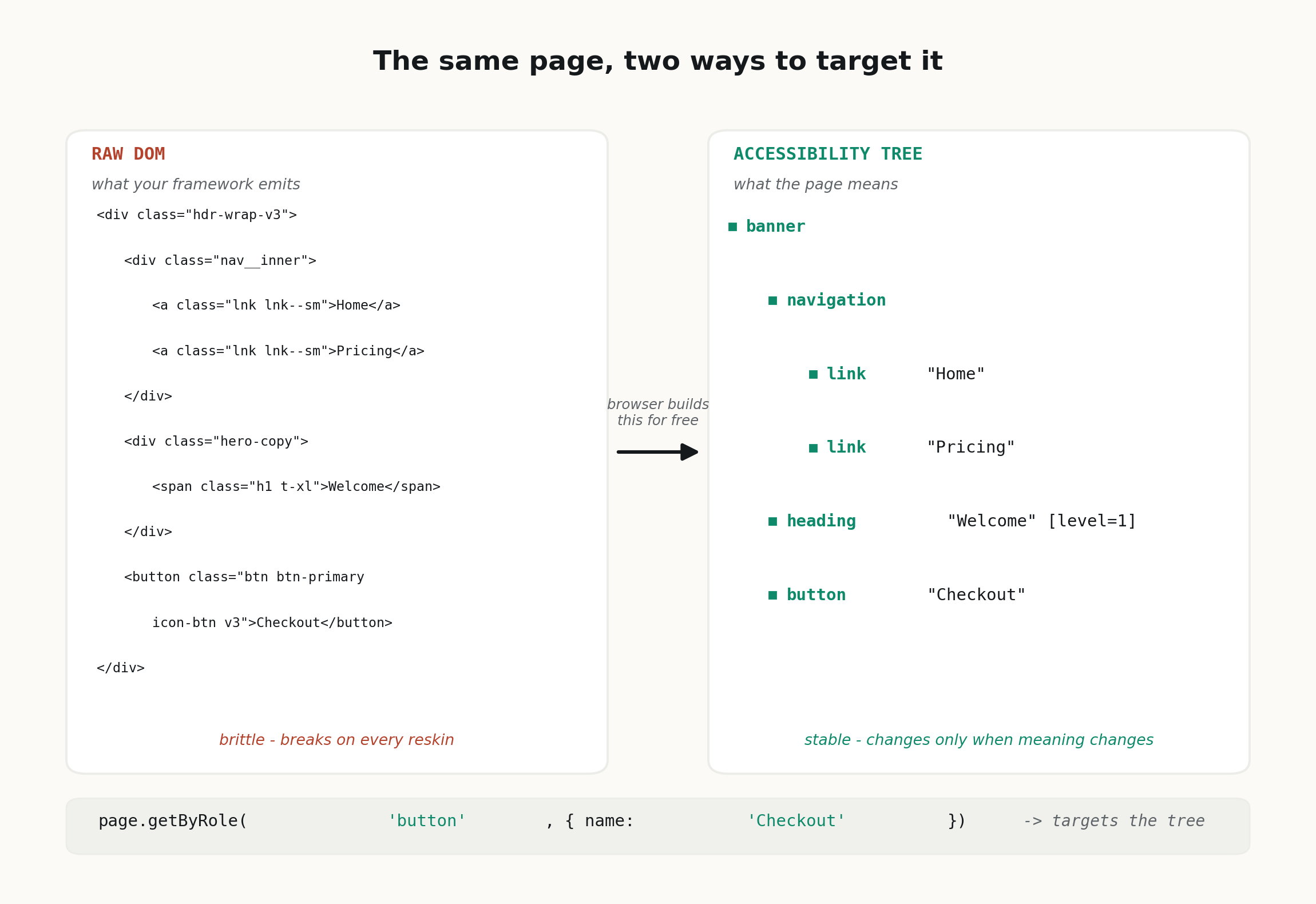
The DOM is what your framework emits. The accessibility tree is what the page means. Test the second one and most redesigns stop touching your tests at all.
The payoff is that the accessibility tree is stable in exactly the way markup is not. Reskin the button, wrap it in three more divs, swap the CSS framework — as long as it’s still a button that says “Checkout”, the tree doesn’t move. You’ve anchored your test to intent instead of to structure.
Why CSS selectors and XPath break
Plenty of people dislike XPath on aesthetic grounds. That’s not the argument. The argument is that a CSS or XPath selector couples your test to implementation detail that has nothing to do with whether the feature works.
Playwright’s own best-practices guide says it without hedging: “Your DOM can easily change so having your tests depend on your DOM structure can lead to failing tests.” Their example is a class selector — button.buttonIcon.episode-actions-later — and the warning that “should the designer change something then the class might change, thus breaking your test.” That’s not a hypothetical. That is the class-rename morning we opened with.
A CSS selector answers “which element sits at this position in the markup?” That is the wrong question. A user — and, importantly, a screen-reader user — never asks that. They ask “where’s the Checkout button?” The gap between those two questions is where flaky, high-maintenance suites are born.
getByRole: locate the page the way a screen reader does
The first tool is the locator. Instead of page.locator(‘button.btn-primary’), you write:
await page.getByRole(‘button’, { name: ‘Checkout’ }).click();
That reads almost like a sentence, and it resolves through the accessibility tree. getByRole finds the element by its ARIA role and accessible name — the same two properties a screen reader announces. Playwright recommends these user-facing locators as the default, above test IDs and well above CSS/XPath, and we agree with the ordering.
There’s a quieter benefit people miss. When you write getByRole(‘button’, { name: ‘Checkout’ }) and it can’t find the element, that’s not just a test failure — it’s often a real accessibility bug. If your “button” is a <div onclick> with no role and no name, getByRole won’t see it, because a screen reader wouldn’t either. Your functional test just doubled as an accessibility check without you asking it to. That’s the theme of this whole approach: you get two kinds of coverage from one line.
What are ARIA snapshots?
getByRole is great for “click this, assert that.” But it checks one element at a time. What about the shape of the page — the fact that the header has a nav, the nav has three links in a particular order, the main region leads with an <h1>? Asserting all of that with individual locators is tedious and easy to get half-right.
That’s what ARIA snapshots are for. An ARIA snapshot is a YAML representation of the accessibility tree for a page or a region. You capture it once, commit it, and every future run compares the live tree against it. It landed in Playwright 1.49 (released 20 November 2024) via the toMatchAriaSnapshot assertion. Straight from the official docs, a snapshot looks like this:
– banner:
– heading /Playwright enables reliable end-to-end/ [level=1]
– link “Get started”:
– /url: /docs/intro
– link “Star microsoft/playwright on GitHub”:
– /url: https://github.com/microsoft/playwright
And the assertion that checks it:
await expect(page.getByRole(‘banner’)).toMatchAriaSnapshot(`
– banner:
– heading /Playwright enables/ [level=1]
– link “Get started”
`);
How to read the snapshot syntax
Notice the details, because they’re the good part. Each line is – role “name” [attribute=value]. Names in quotes are exact; /patterns/ are regex, so you can match heading /Issues \d+/ without pinning the exact count.
Attributes like [level=1] capture heading depth, and states like [checked], [disabled], or [pressed=true] capture control state. The /url property asserts where a link actually goes. And /children lets you choose how strict the match is — contain (the default) checks the listed children exist in order, while equal and deep-equal demand an exact match. Matching is case-sensitive, whitespace-collapsing, and order-sensitive.
How do you test with ARIA snapshots?
You don’t write these YAML trees by hand — that would defeat the point. Playwright generates them for you, and the workflow is short.
Capture, commit, compare
Start with an empty assertion and let Playwright fill it in. Write toMatchAriaSnapshot(”), run the test once, and Playwright writes the current accessibility tree into the assertion (or a companion .aria.yml file). Playwright’s codegen also has a dedicated “Aria snapshot” tab, and page.ariaSnapshot() dumps the tree programmatically if you’d rather inspect it.
Once the snapshot is committed, every run compares the live tree against it. When a change is intentional — you added a nav link on purpose — regenerate with a single flag:
npx playwright test –update-snapshots
Review the diff like any other code change, commit it, move on. That’s the whole loop: capture, commit, compare, and regenerate on purpose.
What one ARIA snapshot actually catches
Here’s the thing that took us a while to appreciate. An ARIA snapshot catches two entirely different classes of bug in a single assertion, and that’s rare.
Structural regressions. A developer accidentally nests the nav inside the wrong container, or a conditional render drops the <h1>, or a list that should have five items now renders three. A screenshot test might not flinch if it looks roughly the same; a CSS-selector test only fails if you happened to be asserting that exact element. The ARIA snapshot fails because the shape of the tree changed.
Accessibility drift. This is the one nobody’s watching. Someone swaps a semantic <button> for a styled <div> and the button role vanishes from the tree. A refactor strips the aria-label and the accessible name goes empty. A heading gets demoted from level=1 to level=3 for styling reasons, quietly wrecking the document outline. Your snapshot catches all of it, because all of it changes the accessibility tree — the exact same tree assistive tech relies on.
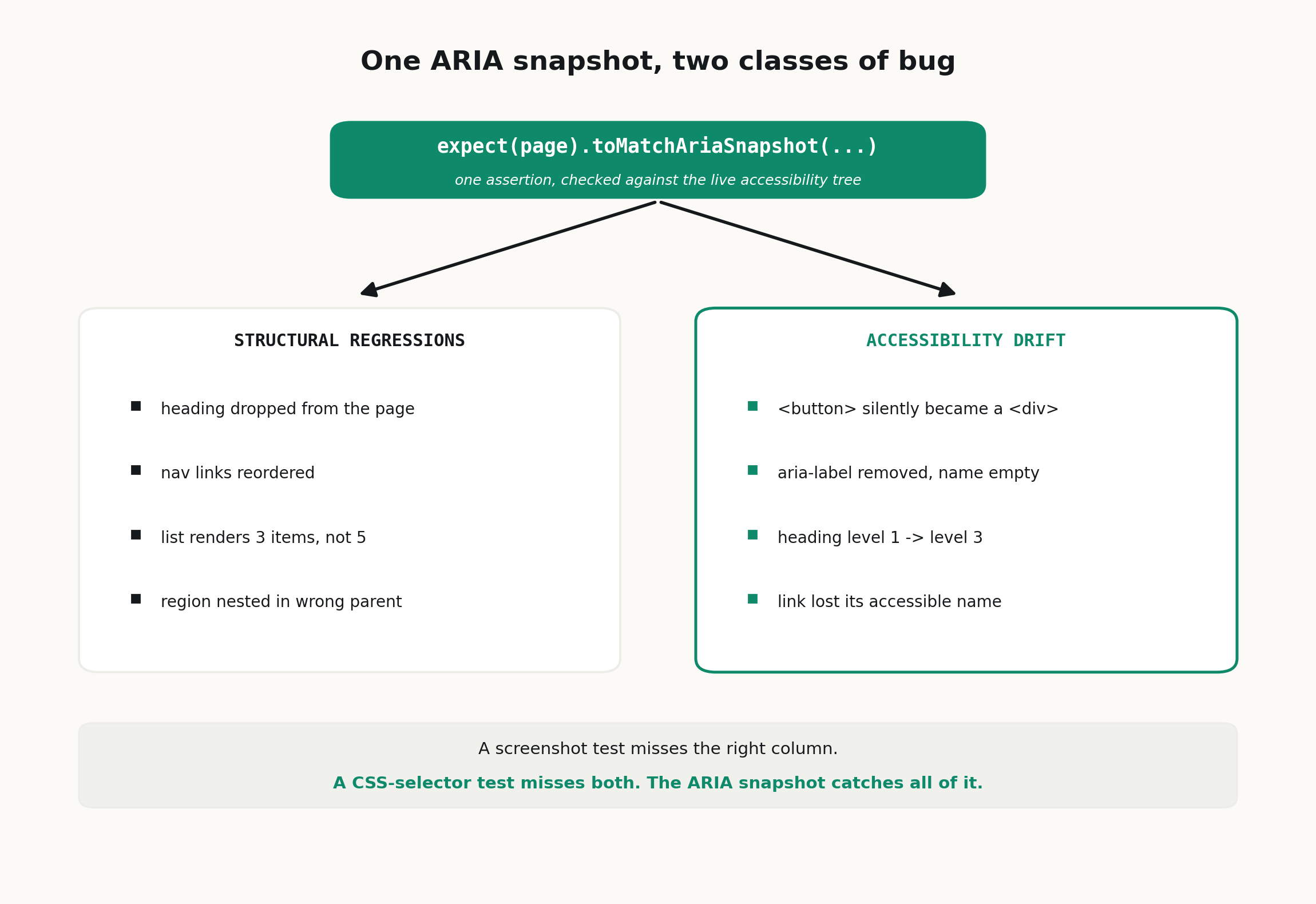
Most assertion types cover one column. The ARIA snapshot is the only cheap way we know to guard both at once — which is why it earns its place even in suites that don’t consider themselves “accessibility projects.”
And accessibility drift is not a niche worry. The WebAIM Million report for 2026, published 30 March 2026, found detectable WCAG failures on 95.9% of the top one million home pages — up from 94.8% a year earlier — averaging 56.1 errors per page. Nearly every site on the public web ships accessibility bugs, and most ship more each year, not fewer. A test that fails when a button loses its name is quietly doing WCAG regression testing for free. That’s the kind of coverage teams normally pay for a separate audit to get.
Migrating without a big-bang rewrite
You don’t need to rip out every selector this quarter. The move that works:
- Change the default for new tests first. Set the team convention: getByRole and other user-facing locators are the default; a CSS selector needs a reason and a comment. New rot stops immediately.
- Add ARIA snapshots to your highest-value pages. Checkout, login, the main dashboard. One toMatchAriaSnapshot per key page or region gives you structural + accessibility coverage in a handful of lines.
- Fix the accessibility bugs the migration surfaces. When getByRole can’t find your “button,” resist the urge to fall back to a CSS selector. That’s the tool telling you the element is broken for real users. Fix the element.
- Migrate the brittle selectors as they break. Every time a CSS-selector test fails on a redesign, rewrite that one to a role-based locator instead of patching the selector. The worst offenders convert themselves.
If your existing suite is large and you’d rather not pull engineers off the roadmap to do this, that’s a normal reason to bring in help — it’s the sort of audit-and-convention work we do at Testvox as part of a broader automation testing review, and the case studies show how the incremental version plays out.
ARIA snapshots vs CSS selectors
This is the comparison teams actually weigh, so let’s put the two side by side. Both are ways to assert against a page in Playwright; they answer very different questions.
| Dimension | ARIA snapshots (accessibility tree) | CSS selectors |
| What you assert against | The accessibility tree — roles, accessible names, states | DOM structure — classes, IDs, XPath, nth-child |
| Stability on redesign | Survives reskins and re-nesting; changes only when meaning changes | Breaks on a class rename, re-order, or wrapper change |
| Readability | Semantic YAML tree that reads like the page’s intent | Positional, opaque strings a reviewer has to decode |
| What it catches | Structural regressions and accessibility drift, in one assertion | Only the one element you targeted; blind to semantics |
| Accessibility coverage | Doubles as WCAG regression testing for free | None — a styled <div> passes fine |
| Maintenance when a change is intentional | Regenerate with –update-snapshots; regex + contain for dynamic bits | Hand-patch each broken selector, one at a time |
| Playwright support | toMatchAriaSnapshot since v1.49 (Nov 2024) | page.locator(css) — always available |
| Best at | Locking the shape and semantics of a page or region | The rare escape hatch when no role or name exists |
Our verdict: for browser testing in 2026, ARIA snapshots (and role locators) should be your default, and CSS selectors the last resort you justify in a code comment. The accessibility tree changes far less often than the DOM, so snapshot-based tests are more stable, more readable, and quietly guard accessibility on top of function. CSS selectors still earn a place for the odd element that genuinely exposes no role or accessible name — a decorative canvas handle, a third-party widget you can’t fix — but that’s the exception, not the house style. If you’re starting a suite today, reach for the accessibility tree first.
When are ARIA snapshots the wrong tool?
Because we’d be selling you something otherwise: this approach has real limits.
ARIA snapshots check structure and semantics, not pixels. If your bug is “the modal renders 4px off and overlaps the button,” the accessibility tree looks perfectly fine — you still want a visual/screenshot snapshot for that.
They can also only assert what the tree exposes. Deeply canvas-based or WebGL UIs barely have an accessibility tree to snapshot, so there’s little for the assertion to hold onto. And a snapshot that’s too strict becomes its own maintenance headache — if you pin exact text on content that legitimately changes, you’re back to babysitting. Use regex for dynamic bits and contain matching for regions where order-plus-extras is fine.
The honest framing: role locators should be your default, ARIA snapshots should guard your key pages, and a small number of screenshot snapshots should cover the genuinely visual components. Three tools, three jobs. The mistake is using CSS selectors for all three.
Frequently asked questions about ARIA snapshots
What is an ARIA snapshot in Playwright?
An ARIA snapshot is a YAML representation of a page’s accessibility tree that you assert against with toMatchAriaSnapshot. It captures roles, accessible names, and states (like heading [level=1]), so one assertion locks in the structure and semantics of a page or region instead of a single element.
How do you test with ARIA snapshots?
Write toMatchAriaSnapshot(”), run the test once so Playwright captures the current tree, then commit it. Every later run compares the live accessibility tree against the committed one. When a change is intentional, regenerate with npx playwright test –update-snapshots and review the diff like any other code change.
ARIA snapshots vs CSS selectors — which should I use?
Default to ARIA snapshots and role-based locators; keep CSS selectors as a justified last resort. The accessibility tree changes far less than the DOM, so snapshot tests survive redesigns, read more clearly, and catch accessibility drift too. Reach for a CSS selector only when an element genuinely exposes no role or accessible name.
Do ARIA snapshots replace my accessibility audits (axe, Lighthouse)?
No, and don’t market them that way internally. axe-core and Lighthouse check rules — contrast, missing alt text, ARIA misuse. ARIA snapshots check regressions against a known-good tree. They’re complementary: the audit tells you what’s wrong today; the snapshot tells you when something that was right quietly broke.
Won’t ARIA snapshots be flaky on dynamic content?
Only if you make them exact. Use regex names (heading /\d+ results/), lean on the default contain matching so extra children don’t fail the test, and snapshot stable regions rather than whole volatile pages. Done that way they’re less flaky than the selector tests they replace, because the tree changes far less often than the DOM.
Which Playwright version do I need for ARIA snapshots?
toMatchAriaSnapshot landed in v1.49 (November 2024) and has been refined since — v1.60 let it run against a whole Page, not just a locator. The current line is v1.61, bundling Chromium 149, Firefox 151, and WebKit 26.5. Anything from 1.49 up will do the job; upgrade if you can, since the codegen and snapshot-update tooling keeps improving.
Is getByRole slower than a CSS selector?
In practice, not enough to matter. Resolving through the accessibility tree adds negligible time next to the network and rendering waits that dominate any real end-to-end test. You’re trading microseconds for a suite that survives your next redesign. Easy trade.
Do ARIA snapshots work with React, Vue, and other frameworks?
Yes. The accessibility tree is built by the browser from whatever HTML your framework renders, so ARIA snapshots are framework-agnostic — React, Vue, Svelte, Angular, or plain HTML all produce the same tree Playwright reads. What matters is the semantic markup you emit, not the framework that emits it.
Key takeaways
- The accessibility tree is the semantic layer the browser builds for assistive tech; it barely moves when your markup does, which is why testing against it beats testing against CSS selectors.
- ARIA snapshots (toMatchAriaSnapshot, Playwright 1.49+) capture that tree as YAML so one assertion locks the whole structure — capture, commit, compare, and regenerate with –update-snapshots on purpose.
- One snapshot catches two bug classes at once: structural regressions and accessibility drift — coverage most other assertion types miss.
- ARIA snapshots vs CSS selectors: the tree wins on stability, readability, and free accessibility coverage; keep CSS selectors as a justified last resort for elements with no role or name.
- Migrate incrementally — role locators as the default for new tests, snapshots on your highest-value pages, and brittle selectors rewritten as they break.
Sitting on a large Playwright suite that shatters every redesign? Talk to the Testvox automation testing team and we’ll help you move it onto the accessibility tree without pulling engineers off the roadmap.

18 January 2023


ABOUT TESTVOX

Testvox is a software testing company help your product reach its full potential. Get full cycle testing for your mobile and web applications while ensuring all quality assurance standards are met... Read More
100+
Applications
Assured
Assured

5 Star Rating

5 Star Rating
“By participating in our release lifecycle, Testvox's standard QA process has helped us to launch quality products faster.”

Rima Hudaifa
Manager | Cadvil
Manager | Cadvil
