 25 April 2026

Transform QA: A Step-by-Step Guide to Playwright Automation
30 April 2026
 10:33 MIN Read time
  BY
Amju
BY
Amju
Manual testing is quietly killing your release velocity. When your QA team spends 60% of sprint time clicking through the same flows, bugs slip through anyway, and your competitors ship twice as fast, something has to change. Playwright, Microsoft’s modern browser automation framework, gives resource-constrained startups and SMEs in India and the UAE a real path to faster, more reliable releases without hiring an army of testers. This guide walks you through every step of that migration, from building the business case to scaling coverage across your entire product.
Table of Contents
- Why move from manual testing to Playwright automation?
- What you need before migrating: Skills, tools, and requirements
- Step-by-step: How to migrate from manual testing to Playwright
- Troubleshooting: Handling edge cases and reducing flaky tests
- How to verify success and scale automation coverage
- What most teams miss about Playwright automation
- Ready to automate? Testvox can help you transform QA
- Frequently asked questions
Key Takeaways
| Point | Details |
|---|---|
| Incremental migration is best | Start with new Playwright tests and phase out manual and Selenium scripts gradually for safer transitions. |
| Parallel execution boosts speed | Playwright’s built-in parallel runs slash QA cycle times and speed up release pipelines. |
| Avoid hard waits and shared state | Stable Playwright tests rely on network waits and good selectors, not force actions or global state. |
| Leadership matters | Automation success requires buy-in, upskilling, and quality reviews as much as it does tools. |
| Playwright enables future-ready QA | With effective implementation, Playwright prepares teams for both current and upcoming software demands. |
Why move from manual testing to Playwright automation?
The business case for Playwright is not just about speed. It is about compounding returns. Every manual test case you automate pays dividends on every future sprint. That math gets very attractive, very fast.
The most immediate win is parallel execution. Native parallel test execution in Playwright supports 15 to 30 workers on an 8-core machine without needing a Selenium Grid, which means your CI/CD pipeline can run hundreds of tests in the time it used to take to run dozens. For teams shipping on tight sprint cycles, that difference is the gap between a Friday deployment and a Monday morning scramble.
Beyond raw speed, Playwright’s auto-wait mechanism dramatically reduces flaky tests. Older frameworks like Selenium required explicit waits sprinkled throughout test scripts. Playwright waits for elements to be actionable before interacting with them, which eliminates a whole class of intermittent failures that used to eat hours of debugging time.
Here is what else makes Playwright the right choice for modern teams:
- Cross-browser coverage out of the box: Chromium, Firefox, and WebKit are all supported with the same test code, so you validate your app across browsers without maintaining separate test suites.
- Modern API design: Playwright’s API is built for today’s JavaScript and TypeScript ecosystems, which means your developers can contribute to test code without a steep learning curve.
- Built-in trace viewer: When a test fails in CI, the trace viewer gives you a step-by-step visual replay of exactly what happened, cutting debug time significantly.
- Simpler CI/CD integration: CI setup with GitHub Actions is straightforward and does not require additional infrastructure.
- Codegen tool: Playwright can record your interactions and generate test code automatically, which is a great starting point for teams new to automation.
“Automation is not just a QA concern. When your developers see green CI builds consistently, they ship with more confidence. That confidence compounds over time.”
If you are thinking about upgrading your QA strategy with Playwright, it is worth understanding that the framework’s value extends beyond test execution. Teams that adopt Playwright properly also report better developer-QA collaboration because tests live in the same codebase and follow the same review process as production code. That cultural shift alone is worth the migration effort.
Pro Tip: Start by running Playwright’s parallelism on your longest-running smoke test suite. A 40-minute manual regression that takes 20 minutes in Selenium can often drop to under 5 minutes with Playwright’s parallel workers configured correctly.
For product teams running A/B testing alongside their QA cycles, automated browser tests also make it far easier to validate that experiment variants do not break core user flows, which is a real risk that manual testers often miss under time pressure.
What you need before migrating: Skills, tools, and requirements
Jumping into Playwright without preparation is how teams end up with a half-migrated test suite that nobody maintains. Before you write a single line of automation, get these foundations right.
An incremental migration strategy is the recommended approach: start new tests in Playwright, migrate your most critical paths first, run old and new tests in parallel during the transition, and then deprecate the old framework once confidence is high. This approach avoids the “big bang” rewrite that stalls teams for months.
Here is a prerequisite checklist before your first automation sprint:
| Prerequisite | Details | Priority |
|---|---|---|
| JavaScript or TypeScript basics | At least one team member comfortable with async/await patterns | Critical |
| Node.js installed | Version 18 or higher recommended | Critical |
| Staging environment | Stable, isolated environment for test execution | Critical |
| CI/CD pipeline access | GitHub Actions, Jenkins, or GitLab CI configured | High |
| Test case inventory | Documented manual test cases to prioritize for migration | High |
| Playwright installed | Via npm, with browsers downloaded | Critical |
| Codebase access | QA team can read application source for selector strategy | Medium |
| Stakeholder alignment | CTO and dev leads agree on migration timeline and KPIs | High |
Non-negotiables for your first automation sprint:
- At least one engineer or QA lead who can write and review TypeScript
- A stable staging environment that mirrors production closely enough to trust test results
- A defined list of the top 10 to 15 critical user flows to automate first
- Agreement on what “done” looks like: coverage percentage, pass rate threshold, or both
- A shared folder or repository structure for test files that the whole team understands
If you are considering scalable Playwright automation through a managed service, these prerequisites still apply. Even an external team needs access to your staging environment, codebase, and a clear list of what matters most to your business.
Step-by-step: How to migrate from manual testing to Playwright
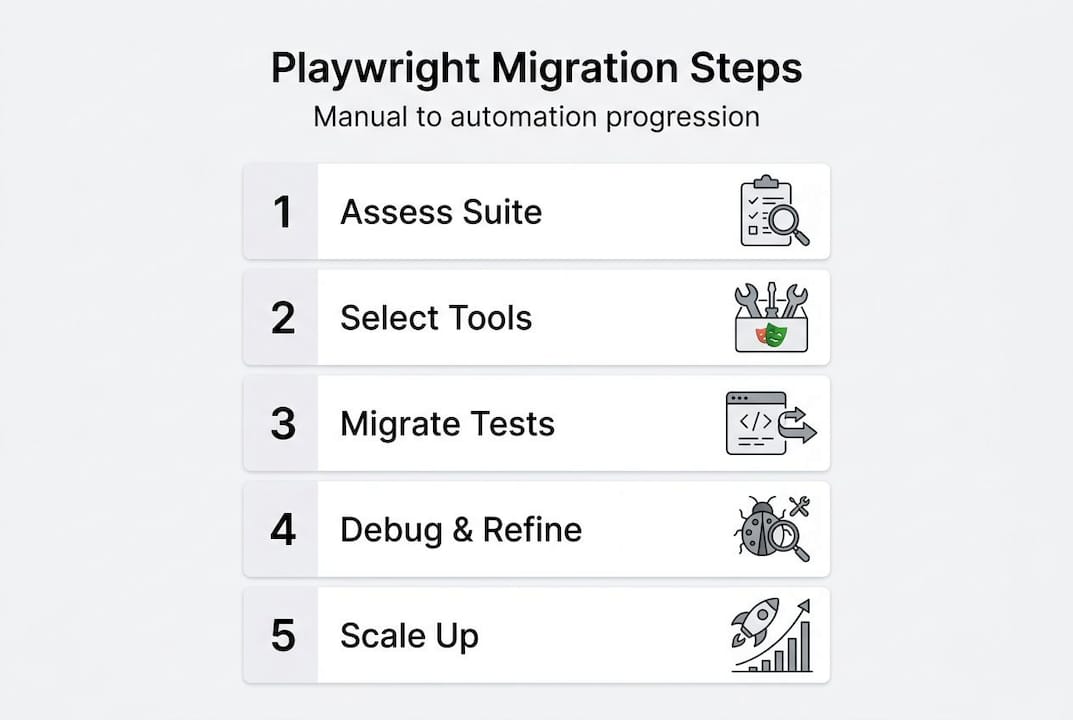
The recommended migration approach is always incremental. Here is how to execute it without disrupting your current release cycle.
- Audit your existing test cases. Categorize every manual test by frequency, criticality, and complexity. High-frequency, high-criticality tests go to the top of the automation queue.
- Set up Playwright in a new branch. Install Playwright, configure your test directory, and write your first two or three tests against the most stable user flows. Login, checkout, and form submission are good starting points.
- Automate new features first. Any feature your team is building right now gets a Playwright test written alongside it. This builds the habit without touching legacy manual cases.
- Migrate critical paths from manual to Playwright. Work through your priority list systematically. Aim for 5 to 10 migrated tests per week depending on team size.
- Run Playwright and manual tests in parallel. Do not retire manual cases until the Playwright equivalent has passed reliably for at least two full sprint cycles.
- Integrate into CI/CD. Once you have 30 to 40 passing tests, add Playwright to your pipeline so it runs on every pull request.
- Deprecate old methods. Once parallel validation confirms Playwright coverage is solid, retire the manual equivalents and update your QA documentation.
| Approach | Setup time | Maintenance effort | Parallelism | Debug tools |
|---|---|---|---|---|
| Manual testing | None | Very high | None | Screenshots only |
| Selenium | High | High | Requires Grid | Limited |
| Playwright | Low | Low | Native (15-30 workers) | Trace viewer, video, screenshots |
You can explore a real-world example in this Playwright migration case study that shows how teams go from a fragile test setup to a reliable automation framework in a matter of weeks.
Pro Tip: Never migrate your entire test suite at once. Teams that attempt a full rewrite in one sprint almost always end up with a broken suite and a frustrated team. Incremental migration keeps releases stable while automation coverage grows steadily.
Troubleshooting: Handling edge cases and reducing flaky tests
Flaky tests are the number one reason automation initiatives stall. A test that fails randomly is worse than no test at all because it trains your team to ignore failures. Here is how to prevent that outcome.
The most common source of flakiness is dynamic content. Pages that load data asynchronously, render elements conditionally, or depend on network responses need careful handling. Handle dynamic content with data-testid attributes and network waits like “waitForResponse, and avoid force: trueclicks orexpect.poll` shortcuts that mask real issues.
“Trace Viewer is your secret debugging weapon. Before you spend an hour reading logs, open the trace and watch exactly what Playwright saw during the failed test. You will find the answer in 90 seconds.”
Top 5 Playwright anti-patterns and how to avoid them:
- Hard waits (
page.waitForTimeout): These make tests slow and brittle. Replace them withwaitForSelectororwaitForResponsethat react to actual application state. force: trueon click actions: This bypasses Playwright’s actionability checks and hides real UI bugs. If an element is not clickable, find out why instead of forcing it.- Shared state between tests: Tests that depend on each other’s data or session state fail unpredictably. Each test should set up and tear down its own state.
- XPath selectors: They break whenever the DOM structure changes. Prefer
data-testidattributes or Playwright’s role-based locators likegetByRole. - Testing implementation details instead of user stories: Tests that check internal component state rather than visible user outcomes break with every refactor. Write tests that mirror what a real user does.
For teams running cross-browser Playwright testing, flakiness patterns often differ by browser. A test that passes reliably on Chromium may fail intermittently on WebKit due to timing differences. Run your full suite on all three browsers in CI to catch these early rather than discovering them in production.
When you are debugging, the trace viewer should be your first stop, not your last. It records every action, network request, and DOM snapshot during a test run, which means you can replay failures frame by frame without needing to reproduce them locally. That capability alone saves hours per sprint.

Avoiding A/B testing errors is another area where solid Playwright tests add value. When you are running experiments that change UI elements or flows, automated tests catch regressions that would otherwise only surface in user feedback after the fact.
How to verify success and scale automation coverage
Getting your first 30 tests passing is a milestone. Scaling to 200 reliable tests that actually protect your releases is the real goal. Here is how to get there.
Start by validating these automation KPIs after your first sprint:
- Test coverage percentage for critical user flows (target 80% or higher for priority paths)
- Flaky test rate (anything above 5% needs immediate attention)
- Average CI run time (should be decreasing as parallelism is configured)
- Bug escape rate (bugs found in production that automation missed)
- Time saved per sprint compared to equivalent manual execution
Once your baseline is healthy, expand coverage with these steps:
- Add Playwright tests for every new feature before it merges to main.
- Identify the next tier of high-value manual tests and schedule migration in the next sprint.
- Configure native parallel execution with 15 to 30 workers to keep CI run times short as the suite grows.
- Introduce test tagging so you can run subsets (smoke, regression, critical path) depending on the context.
- Schedule a monthly review of failed and unstable tests to refactor or retire them.
- Gather feedback from developers about which tests are causing friction and address those first.
Pro Tip: Use Playwright’s --shard flag to split your test suite across multiple CI runners. This is the fastest way to scale QA without extra testers while keeping build times under control as your suite grows.
Continuous improvement is not optional. Test suites that are not actively maintained become liabilities. Schedule time every sprint to review coverage gaps, update selectors that have drifted, and retire tests for features that no longer exist.
What most teams miss about Playwright automation
Here is an uncomfortable truth: most Playwright migrations fail not because of the tool but because of the mindset behind the implementation.
Playwright’s low barrier to entry is actually a double-edged situation. Because it is relatively easy to write a test, teams often write a lot of tests quickly without thinking about quality, maintainability, or what those tests are actually protecting. The result is automation sprawl: hundreds of tests that are slow, fragile, and do not map to any business-critical outcome. Nobody owns them. Nobody trusts them. They get ignored.
The teams that get lasting ROI from Playwright share one thing in common: they treat test quality the same way they treat code quality. That means code reviews for test files, shared naming conventions, reusable page object models, and a clear owner for the test suite’s health. It also means leadership buy-in that goes beyond “let’s automate testing.” CTOs and founders need to ask for quality KPIs in sprint reviews, not just feature velocity.
The hardest lesson we have seen teams learn is that investing in 50 well-designed, reusable test scenarios tied to real user stories delivers far more value than 200 check-the-box automations that nobody maintains. Less is more when the tests you have are trustworthy.
Set up a monthly review of your failed and unstable test cases. Treat that meeting with the same seriousness as a production incident review. If a test is failing consistently, it is either catching a real bug or it is a bad test. Both outcomes deserve attention. This practice, more than any framework choice, is what separates teams that sustain automation from teams that abandon it after six months.
If you want a framework for building that culture, the principles behind quality engineering for 2026 are a strong starting point. The shift from “testing as a phase” to “quality as a continuous practice” is what makes automation investments stick.
Ready to automate? Testvox can help you transform QA
Migrating from manual testing to Playwright is a meaningful investment, and getting the foundation right from the start saves months of painful rework later.

Testvox partners with startups and SMEs across India and the UAE to build robust, maintainable Playwright automation frameworks tailored to your product and team structure. Whether you need a complete migration strategy or want to validate your existing setup, our strategy guide to Playwright automation is a strong first read. You can also explore how we helped a Y Combinator startup in our QA auditing case study to see what a focused engagement looks like in practice. For teams building products that need to meet accessibility standards, our accessibility testing solutions complement your automation layer with compliance coverage. Reach out for a personalized consultation and let’s map out your migration path together.
Frequently asked questions
How long does a typical migration from manual to Playwright take?
Most teams complete critical automation in 4 to 8 weeks using an incremental migration approach that starts with new tests and prioritizes critical paths before retiring old methods.
Can Playwright work in our existing CI/CD pipeline?
Yes. Playwright integrates directly with GitHub Actions and similar tools, and native parallel execution means you do not need a Selenium Grid to run tests at scale.
What are the biggest mistakes to avoid in Playwright automation?
The most damaging mistakes are hard waits, force: true clicks, and shared test state. Instead, use data-testid selectors and waitForResponse to build tests that respond to real application behavior rather than arbitrary timing.
How does Playwright differ from Selenium for modern teams?
Playwright supports 15 to 30 parallel workers natively on an 8-core machine, requires no Grid setup, and includes a built-in trace viewer that makes debugging CI failures far faster than Selenium’s tooling.
Can Playwright automation cover mobile and desktop browsers?
Yes. Playwright automates Chromium, Firefox, and WebKit across desktop environments and supports mobile viewport emulation, allowing you to validate responsive behavior and mobile user flows from the same test code base.
Recommended
- Upgrade Your QA Strategy with Playwright Automation
- Playwright features every QA team needs to use now
- Outsource Playwright Automation for Scalable QA Results
- How Playwright Simplifies Cross-Browser Testing for Startups
- How to Analyze Business Processes for Scalable Automation
25 April 2026


ABOUT TESTVOX

Testvox is a software testing company help your product reach its full potential. Get full cycle testing for your mobile and web applications while ensuring all quality assurance standards are met... Read More
100+
Applications
Assured
Assured

5 Star Rating

5 Star Rating
“By participating in our release lifecycle, Testvox's standard QA process has helped us to launch quality products faster.”

Rima Hudaifa
Manager | Cadvil
Manager | Cadvil
