
 1 August 2026
Playwright Auto-Waiting & Actionability Checks: Why Your Tests Stopped Being Flaky
24 August 2026
 10 min 13 sec
  BY
Harshit Gupta
BY
Harshit Gupta
Our team inherited a digital-banking client’s Selenium suite where a single login test had four Thread.sleep calls stacked inside it. Not because login took twelve seconds — it didn’t — but because someone, months earlier, had added a three-second sleep to stop a failure, then another, then another, each one a small bribe paid so an account holder’s money-transfer screen would load in time. The test passed. Mostly. It also added the better part of a minute to every run for no reason a sober person could defend.
Here’s the payoff up front, because it’s the whole reason this matters: Playwright auto-waiting runs a set of actionability checks before every action and retries them until the element is genuinely ready, which is what makes the timing-related flaky tests of the Selenium era mostly disappear. You stop writing explicit waits and hard sleeps, and the suite gets both faster and steadier. That is the single biggest reliability win we see when a client migrates their test automation off Selenium.
Not because Playwright is magic — because it does, on every single action, the checking you used to do by hand and forget half the time. Let us show you what’s actually happening under the hood, because most people using it every day couldn’t tell you.
What is Playwright auto-waiting?
Playwright auto-waiting is the framework’s built-in habit of refusing to act on an element until that element is actually ready to be acted on. Before a click, a fill, or a check, Playwright runs a series of actionability checks on the target and retries them until they pass or the timeout hits — you don’t add a single line of waiting code to get it.
Contrast that with the Selenium model, where timing is your job. Selenium clicks whatever the locator points at, right now, whether or not the button is ready — and it’s on you to prove the page has caught up first. Every WebDriverWait, every expectedConditions.elementToBeClickable, every hard sleep is a developer standing in for a check the framework won’t run itself.
Playwright starts from the opposite assumption. The official actionability docs describe a framework that waits for you, on every action, so the glue code that used to make up half a Selenium test simply isn’t there to write.
What are actionability checks?
Actionability checks are the specific conditions Playwright verifies on an element before it interacts with it. It will not click a button that fails the checks — it waits, re-evaluates, waits again, until the element passes or the clock runs out.
The five actionability checks Playwright runs
Per the official actionability docs, the checks are:
- Visible — the element has a non-empty bounding box and no visibility:hidden computed style. (Worth knowing: an opacity:0 element passes the visible check; a display:none one fails it.)
- Stable — the element “has maintained the same bounding box for at least two consecutive animation frames.” In plain terms: it’s done sliding, fading, or bouncing in.
- Receives Events — the element is “the hit target of the pointer event at the action point.” This is the one that saved that banking client from the cookie-consent banner that floated over the account holder’s Transfer button. If some overlay would capture the click instead, the check fails and Playwright waits it out.
- Enabled — the element isn’t disabled (no disabled attribute doing its thing).
- Editable — for typing actions, the element is enabled and not read-only.
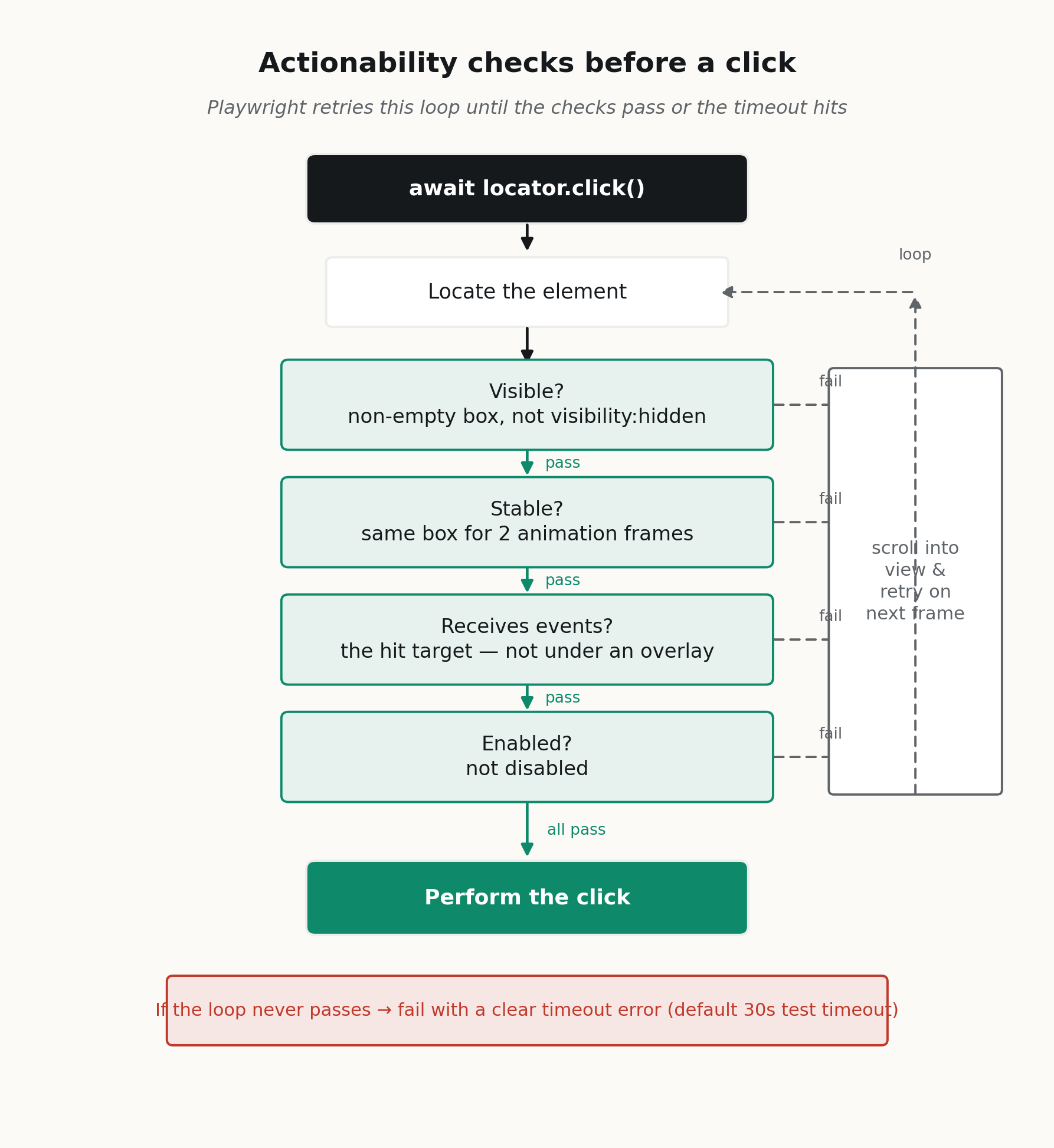
The loop is the whole point. Playwright doesn’t ask “is it ready?” once and give up — it keeps asking until it is, or until the clock runs out.
Why the “receives events” check kills the most flake
The “receives events” check is the one we wish more people understood, because it’s the single most common source of Selenium flake it silently fixes.
The transfer-confirmation modal just animating in? A sticky account header covering the amount field? A balance-updated toast drifting across the viewport? In Selenium those are race conditions you lose intermittently. In Playwright the click waits for the obstruction to clear, because Playwright checked whether the click would actually land on the element you meant — not on whatever happened to be on top of it.
Does every action run every check?
No — and this trips people up, so it’s worth being precise. Playwright applies the checks that make sense for each action. From the docs:
- click(), dblclick(), check(), tap(), setChecked() run all of Visible, Stable, Receives Events, and Enabled.
- hover() and dragTo() run Visible, Stable, Receives Events — but not Enabled.
- fill() runs Visible, Enabled, Editable — but not Stable or Receives Events.
- Low-level escape hatches like dispatchEvent(), focus(), and press() run no actionability checks at all. They do exactly what they say, immediately.
That last group matters. If you reach for dispatchEvent(‘click’) to “make the flaky test pass,” you’ve turned off the very safety checks that make Playwright reliable — you’ve reinvented Selenium’s problem inside Playwright. We found exactly this in that digital-banking client’s suite, dropped onto the transfer-submit step and usually pasted from a Stack Overflow answer, and it’s almost always a sign that something upstream is actually broken and worth fixing instead of bypassing.
How does auto-waiting stop flaky tests?
Auto-waiting stops flaky tests by replacing a guess about time with a check on state. The timing race conditions that dominated Selenium suites — click fired before the element was ready — are exactly what the actionability loop removes.
From a timing bet to a condition
A hard sleep is a bet: “three seconds will be enough.” Sometimes it’s too short and you flake. Usually it’s too long and you waste time on every green run. It’s the worst of both worlds — slow and unreliable.
Auto-waiting replaces the bet with a condition. Playwright waits exactly as long as the element takes to become actionable, and not a millisecond longer. A modal that appears in 200ms costs you 200ms, not a padded 3,000. A slow API response that takes 4 seconds is waited out to 4 seconds. The suite gets faster and steadier at the same time, which is the thing the Selenium tuning treadmill could never give you.
You write far less glue code
And you write less. No WebDriverWait(driver, 10).until(…) wrapping every interaction. You write await page.getByRole(‘button’, { name: ‘Checkout’ }).click() and the waiting is baked in.
Playwright’s best-practices guide puts it flatly: “Locators come with auto waiting and retry-ability.” The glue code that made up half of a Selenium test just isn’t there to write.
For a digital-banking client drowning in a legacy suite, that deletion of glue work is usually the biggest single win of a migration — bigger than the speed. It’s the kind of thing worth auditing before you commit to a rewrite, which is a review we run often at Testvox.
Playwright auto-waiting vs manual waits (Selenium sleeps)
Selenium is the tool most teams migrate from, so this is the comparison we get asked about most. Both drive real browsers; the difference is who owns the waiting. Playwright makes it the framework’s job; Selenium makes it yours.
| Dimension | Playwright auto-waiting | Manual/explicit waits (Selenium sleeps) |
| Reliability | Runs actionability checks (visible, stable, receives events, enabled) before every action and retries until they pass or the timeout hits | No automatic actionability wait — the click fires immediately unless you add a WebDriverWait / ExpectedConditions yourself |
| Code you write | None — waiting is built into locators (“Locators come with auto waiting and retry-ability”) | Explicit waits, implicit waits, or hard Thread.sleep written by hand around interactions |
| Flakiness (timing) | Timing race conditions largely removed; the framework re-checks until the element is ready | Timing is the most common source of flake; a missed or mistuned wait fails intermittently |
| Speed | Waits exactly as long as the element needs, then proceeds | Fixed sleeps over-wait on fast runs and under-wait on slow ones; docs warn a too-high value makes sessions “prohibitive” |
Our verdict: for timing reliability, Playwright auto-waiting wins clearly. Selenium’s own waits documentation confirms it does not automatically wait for an element to be actionable before you interact with it — you add WebDriverWait and ExpectedConditions yourself, and the docs explicitly warn against mixing implicit and explicit waits and against leaning on fixed sleeps. Playwright’s actionability checks do that work on every action, so the whole category of “clicked before it was ready” flake mostly evaporates. Selenium still earns its place where you need its enormous grid ecosystem, legacy-language bindings, or native-mobile testing via Appium — but for greenfield browser test automation in 2026, auto-waiting is the reason we reach for Playwright first.
Where does auto-waiting stop? Assertions you write yourself
Now the honest part, because “Playwright waits for everything” is a myth that will bite you.
Auto-waiting covers actions. It does not cover assertions you write yourself. This is the trap:
// ❌ Does NOT wait. Reads the value once, right now.
expect(await page.getByText(‘Welcome back’).isVisible()).toBe(true);
The best-practices doc calls this out directly: “When using assertions such as isVisible() the test won’t wait a single second, it will just check the locator is there and return immediately.” If that account holder’s post-login welcome banner shows up 100ms later, you flake — and it looks like Playwright’s fault when it’s actually yours.
Use web-first assertions
The fix is web-first assertions — the auto-retrying ones:
// ✅ Retries until visible, or until the assertion timeout.
await expect(page.getByText(‘Welcome back’)).toBeVisible();
toBeVisible(), toHaveText(), toBeEnabled(), toBeChecked(), toHaveCount() and friends retry internally until the condition holds or the assertion timeout is reached — 5 seconds by default, separate from the 30-second default per-test timeout. The rule we give teams is blunt: if you find yourself await-ing a value inside expect(), you’ve almost certainly picked the non-retrying version by accident. Move the await outside, onto expect itself.
The escape hatch: expect().toPass()
Auto-waiting and web-first assertions cover the overwhelming majority of real cases. But sometimes you need to retry a block — an API poll, a value that only settles after two or three things happen, a number on a dashboard that trickles up. For that there’s expect(…).toPass(), which retries a whole function until every assertion inside it passes:
await expect(async () => {
const response = await page.request.get(‘https://api.example.com/status’);
expect(response.status()).toBe(200);
}).toPass({ timeout: 60_000, intervals: [1_000, 2_000, 10_000] });
Reach for it when no single locator assertion expresses what you’re waiting on. Don’t reach for it as a lazy wrapper around code you couldn’t be bothered to make deterministic — that’s just a slower Thread.sleep wearing a nicer coat.
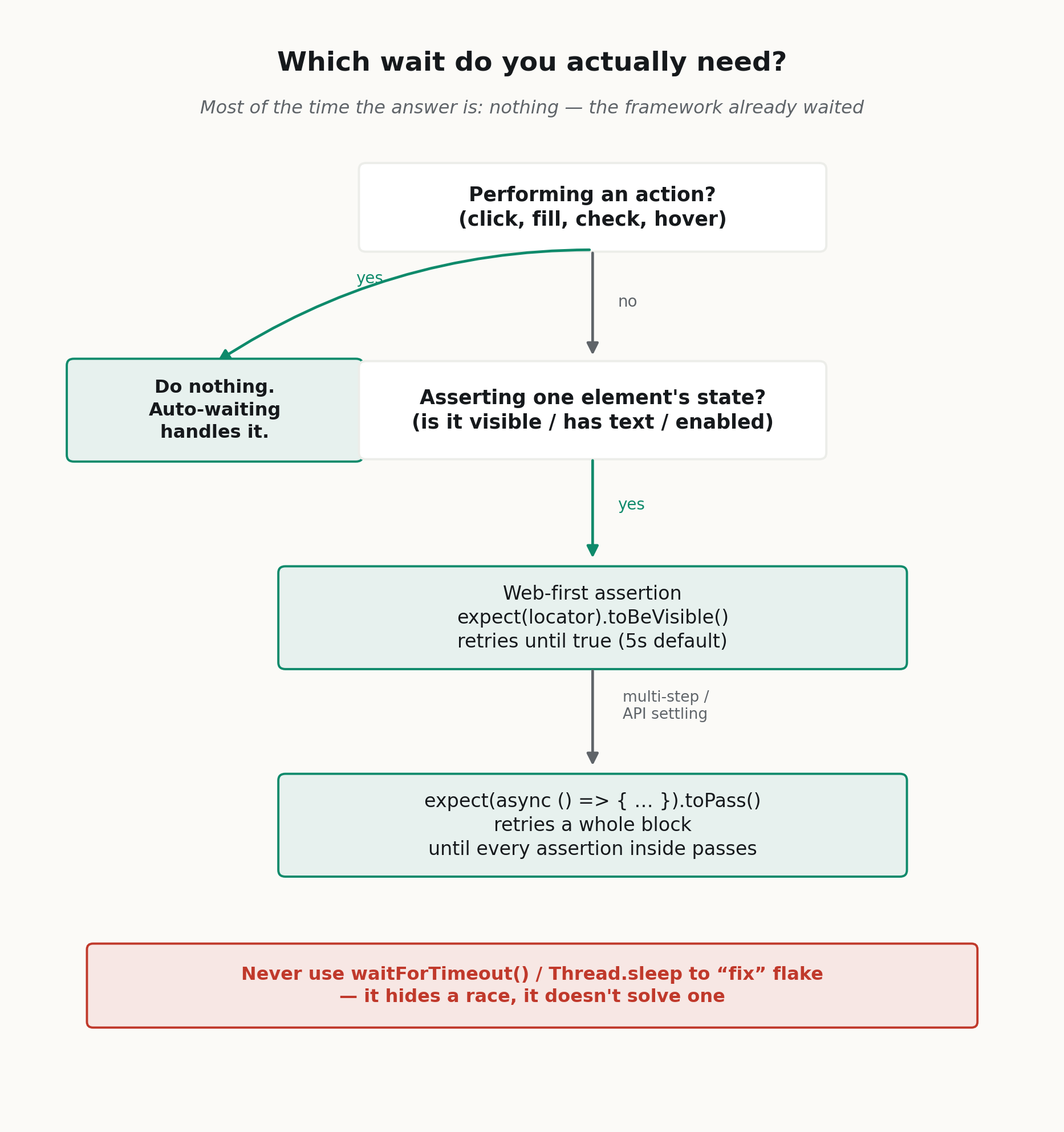
Ninety percent of the time the answer is the leftmost box: do nothing, the framework already waited.
What are the auto-waiting anti-patterns that bring flakiness back?
Playwright makes flake-free tests the default. You have to work to reintroduce the flakiness — but plenty of teams manage it. The usual suspects:
- page.waitForTimeout() in real tests. It’s the Thread.sleep of Playwright, and it’s for debugging only. If a test needs it to pass, the test is hiding a race condition, not fixing one.
- Wrapping await inside expect() — the isVisible() trap above. It reads once and moves on.
- force: true to make a stubborn click land. Forcing skips the “receives events” hit-target check, per the docs. Occasionally legitimate; usually it’s you overruling Playwright when it correctly noticed your button was covered by something. Nine times in ten, the right fix is to dismiss the overlay.
- Dropping to dispatchEvent/evaluate to bypass a check. Same story — you’ve disabled the safety net rather than asked why it caught you.
Every one of these is Playwright telling you something true about your app — an overlay, a timing gap, a disabled state — and the anti-pattern is telling it to shut up. Listen instead. The failing check is usually a bug an account holder would have hit.
Getting a team’s locator and waiting conventions right early is far cheaper than unpicking a suite that’s drifted back to force: true everywhere — it’s exactly the kind of thing our automation testing service and embedded engineers set up so it stays right. The case studies show what a suite people actually trust looks like.
Frequently asked questions about Playwright auto-waiting
What is Playwright auto-waiting?
It’s Playwright’s built-in behaviour of running actionability checks (visible, stable, receives events, enabled, editable) before every action and retrying them until the element is ready or the timeout hits. You get it for free on every locator interaction — no waiting code required.
Does Playwright really eliminate flaky tests?
It eliminates the timing-related flake that dominated the Selenium era — the race conditions you used to paper over with sleeps. It can’t fix flake from genuinely non-deterministic apps, shared test state, or an unreliable backend. Those are real problems auto-waiting was never meant to solve. But the “click happened before the element was ready” category? Largely gone.
What’s the difference between auto-waiting and web-first assertions?
Auto-waiting is automatic and applies to actions — click, fill, check — via the actionability checks. Web-first assertions are the auto-retrying expect(locator).toBeVisible() style checks you write for verification. Actions wait for you; assertions only retry if you use the retrying form. Confusing the two is the number-one cause of self-inflicted flake.
Do I ever still need explicit waits in Playwright?
Rarely, and almost never waitForTimeout. For a block of logic that needs to settle, use expect(…).toPass(). For a specific network response or navigation, use the purpose-built waitForResponse / waitForURL helpers. Reaching for a raw time-based sleep is nearly always a smell.
Playwright auto-waiting vs Selenium waits — what’s the real difference?
Selenium does not automatically wait for an element to be actionable, so you write the waiting yourself with WebDriverWait and ExpectedConditions (its docs even warn against mixing implicit and explicit waits). Playwright runs the actionability checks on every action automatically, so the waiting is the framework’s job, not yours.
How long does Playwright wait by default?
There’s no default timeout on individual actions, but the per-test timeout is 30 seconds and web-first assertions time out after 5 seconds by default. You can tune each of these; the point is that Playwright waits up to those limits and returns the instant the element is ready.
When is force: true actually justified?
When you’ve deliberately decided the “receives events” check is wrong for your situation — for example, testing a click on a partially-covered element on purpose. It should be rare and commented. If force: true is scattered through your suite, that’s not a fix, that’s a diagnosis: your tests are fighting the framework instead of your app.
Is auto-waiting enough on its own for reliable test automation?
Almost, but not quite. Auto-waiting removes timing flake from actions; you still have to use web-first assertions for verification, isolate test state, and avoid the anti-patterns above. Get those right and the framework does the rest.
Key takeaways
- Playwright auto-waiting runs actionability checks — visible, stable, receives events, enabled, editable — before every action and retries until the element is ready or the timeout hits.
- That loop is what stops flaky tests: it replaces a timing bet (Thread.sleep) with a condition, so the suite gets faster and steadier at once.
- Playwright auto-waiting vs manual waits: Selenium doesn’t wait for actionability on its own — you write explicit waits by hand; Playwright makes waiting the framework’s job.
- Auto-waiting covers actions, not assertions — use web-first assertions like toBeVisible(), and expect(…).toPass() for multi-step conditions.
- The anti-patterns (waitForTimeout, force: true, dispatchEvent bypasses) smuggle flakiness back in; each one is Playwright flagging a real bug worth fixing instead of silencing.
Migrating a legacy Selenium suite, or want your Playwright waiting conventions set up so they stay reliable? Talk to the Testvox automation testing team and we’ll help you turn a flaky suite into test automation your team actually trusts.

1 August 2026
 25 April 2026


AI Test Architect & Lead SDET with 11+ years of expertise in Playwright, API testing, automation, and AI/LLM evaluation. He focuses on delivering high-quality, user-centric software through AI-assisted testing, efficient testing strategies, and continuous innovation. Connect with him on
ABOUT TESTVOX

Testvox is a software testing company help your product reach its full potential. Get full cycle testing for your mobile and web applications while ensuring all quality assurance standards are met... Read More
100+
Applications
Assured
Assured

5 Star Rating

5 Star Rating
“By participating in our release lifecycle, Testvox's standard QA process has helped us to launch quality products faster.”

Rima Hudaifa
Manager | Cadvil
Manager | Cadvil
