 17 July 2026
Playwright MCP Server: A Hands-On Guide to AI Browser Automation
1 August 2026
 10:33 MIN Read time
  BY
Harshit Gupta
BY
Harshit Gupta
The first time our team watched an AI assistant drive a real browser through the Playwright MCP server, what struck us wasn’t how clever it looked. It was how boring it looked — in the best possible way.
Here’s the value up front, because it’s the whole point: the Playwright MCP server lets an AI assistant control a real browser through the page’s accessibility tree instead of guessing at pixels. That one design choice is why AI browser automation finally feels reliable enough for real browser testing — no coordinate-guessing, no vision model, no flakiness.
We’d spent a chunk of 2025 fighting with screenshot-based “computer use” demos. You know the ones. The model squints at a picture of the page, guesses that the login button is at roughly pixel (840, 512), clicks, misses by twelve pixels, hits a tooltip instead, and spirals. Impressive in a keynote. Maddening on a Tuesday.
So when we pointed Claude at a staging site with the MCP server wired in and asked it to “sign up, then check the confirmation email link works,” we braced for the usual flailing. It just… did it. It asked the page what was on it, got back a tidy list of roles and labels — button “Create account”, textbox “Email” — clicked the actual element by reference, waited for the network to settle on its own, and moved on. No coordinates required. It works without a vision model. It never relies on guesswork. When the flow broke on a missing redirect, it told us which step broke and why.
That gap — between “AI looking at a screenshot” and “AI reading the page’s structure” — is the whole story of why the Playwright MCP server matters for test automation. Let’s walk through what it is, how to install it, how it compares to the alternatives, and how to use it without getting burned.
What is the Playwright MCP server?
Two moving parts, and it helps to keep them straight.
The protocol: MCP
The Model Context Protocol (MCP) is an open standard Anthropic introduced in November 2024 to give AI assistants a common way to talk to external tools and data — think of it as a USB-C port for LLMs. It stopped being an Anthropic-only thing quickly; through 2025 it was picked up across the industry, including by OpenAI and Google DeepMind. So an “MCP server” is just a tool an AI client can plug into.
The tool: the Playwright MCP server
The Playwright MCP server — published by Microsoft as @playwright/mcp — is one of those tools. It exposes a real, running browser to an AI assistant.
Whatever your assistant is (Claude, GitHub Copilot in VS Code, Cursor, Cline), it can now navigate pages, click, type, upload files, read network traffic, and pull the page’s structure — through a real Chromium, Firefox, or WebKit, not a simulation.
Here’s the design decision that makes it good: it works off the page’s accessibility tree, “not pixel-based input,” and needs “no vision models”. The assistant doesn’t get a JPEG to interpret. It gets structured, semantic text.
How does the Playwright MCP server work?
This is the part worth internalising, because it’s why the thing is reliable.
When the assistant calls browser_snapshot, the server hands back a compact tree of the page — every meaningful element with its ARIA role, its accessible name, and an opaque ref id the model uses to act on it. Something like button “Checkout” [ref=e42]. To click it, the model doesn’t reason about geometry. It says “click e42,” and Playwright does the rest, with all its usual auto-waiting underneath.
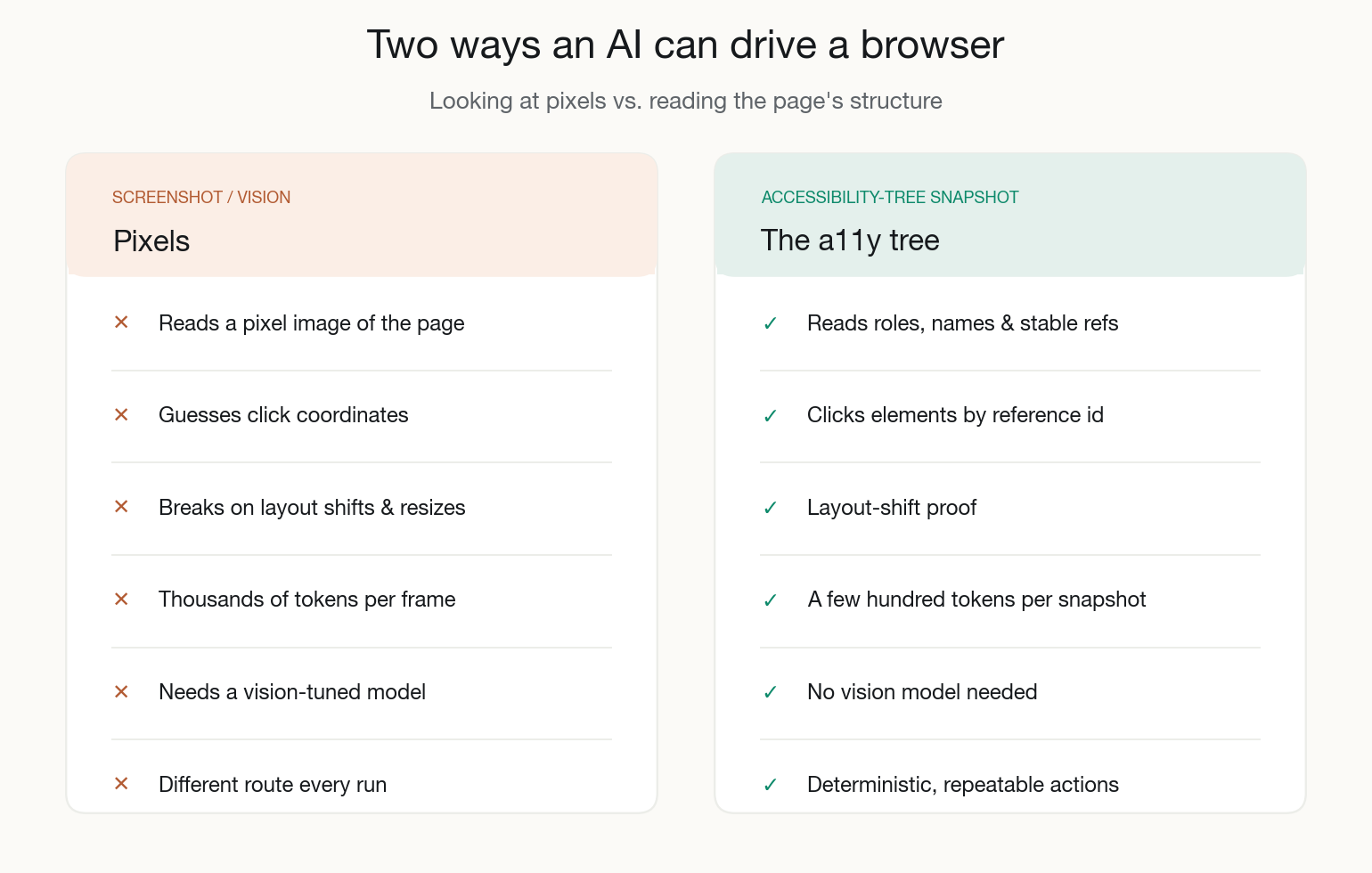
The difference isn’t cosmetic. One approach guesses where things are; the other asks the page what it is.
Why the accessibility tree beats screenshots
Three things fall out of that choice, and we’ve felt all three in practice:
- It’s deterministic. A ref doesn’t move when the CSS changes or the viewport resizes. Vision-based clicking breaks the moment a banner pushes everything down 60px.
- It’s cheap. A structured snapshot is a few hundred tokens; a full-page screenshot re-encoded every step is thousands. Over a long session that’s the difference between “affordable” and “why is my bill like this.”
- It’s honest about semantics. If an element has no accessible name, the snapshot shows that too — which, as a side effect, surfaces real accessibility bugs while you’re just trying to automate a flow.
There’s a screenshot escape hatch (browser_take_screenshot, and an opt-in –caps=vision mode for coordinate clicks on canvas-type UIs), but you reach for it rarely. The accessibility tree is the main event.
How do you install the Playwright MCP server?
The install is genuinely a one-liner. The server runs via npx, so there’s nothing to globally install.
Claude Code
For Claude Code, one command wires it in:
claude mcp add playwright npx @playwright/mcp@latest
VS Code, Cursor, Claude Desktop, Cline
For anything that takes a JSON config — VS Code (Copilot agent mode), Cursor, Claude Desktop, Cline — it’s the same shape:
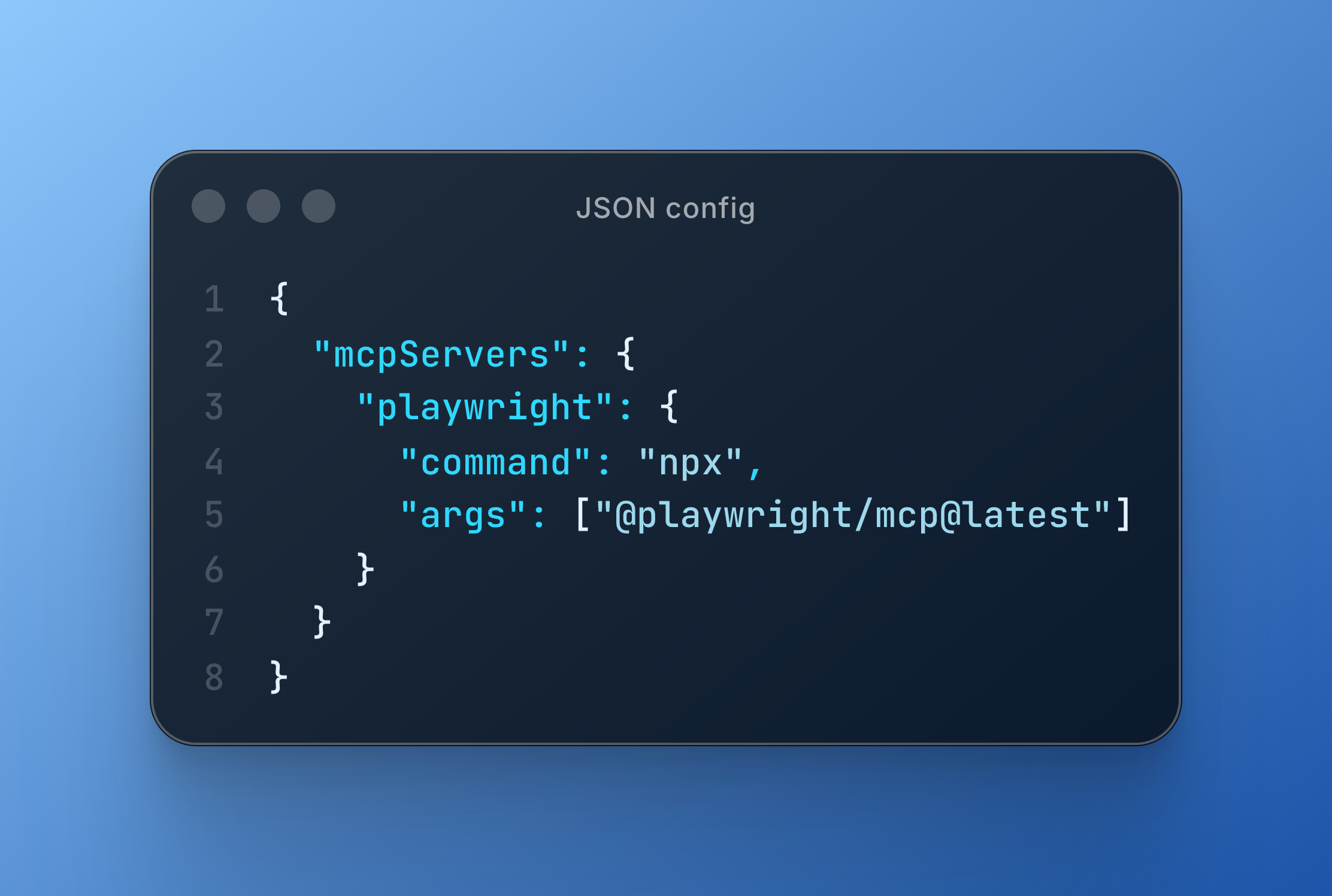
Restart the client, and your assistant now has a browser_* toolset. Ask it to open a URL and describe what it sees, and you’ll get a snapshot back. That’s the whole setup.
Flags worth knowing early
- –headless runs without a visible window (what you want in CI); leave it off and you get to watch the agent work, which is oddly reassuring the first few times.
- –isolated keeps the browser profile in memory only, so nothing persists to disk between runs.
- –caps=pdf,testing,verify turns on optional capability groups — PDF generation, test-assertion helpers, and so on — that are off by default to keep the tool surface small.
- –allowed-origins / –blocked-origins fence the browser to hosts you trust. More on why that matters shortly.
One caveat worth saying out loud: @playwright/mcp is still pre-1.0 — it was first published to npm in March 2025 and, as of this writing, sits at v0.0.78 (9 July 2026), with alpha builds shipping almost daily. Pin a version in CI. Tool names and flags still move between releases.
What does a Playwright MCP session look like?
The loop is simple once you see it, and it repeats until the task is done.
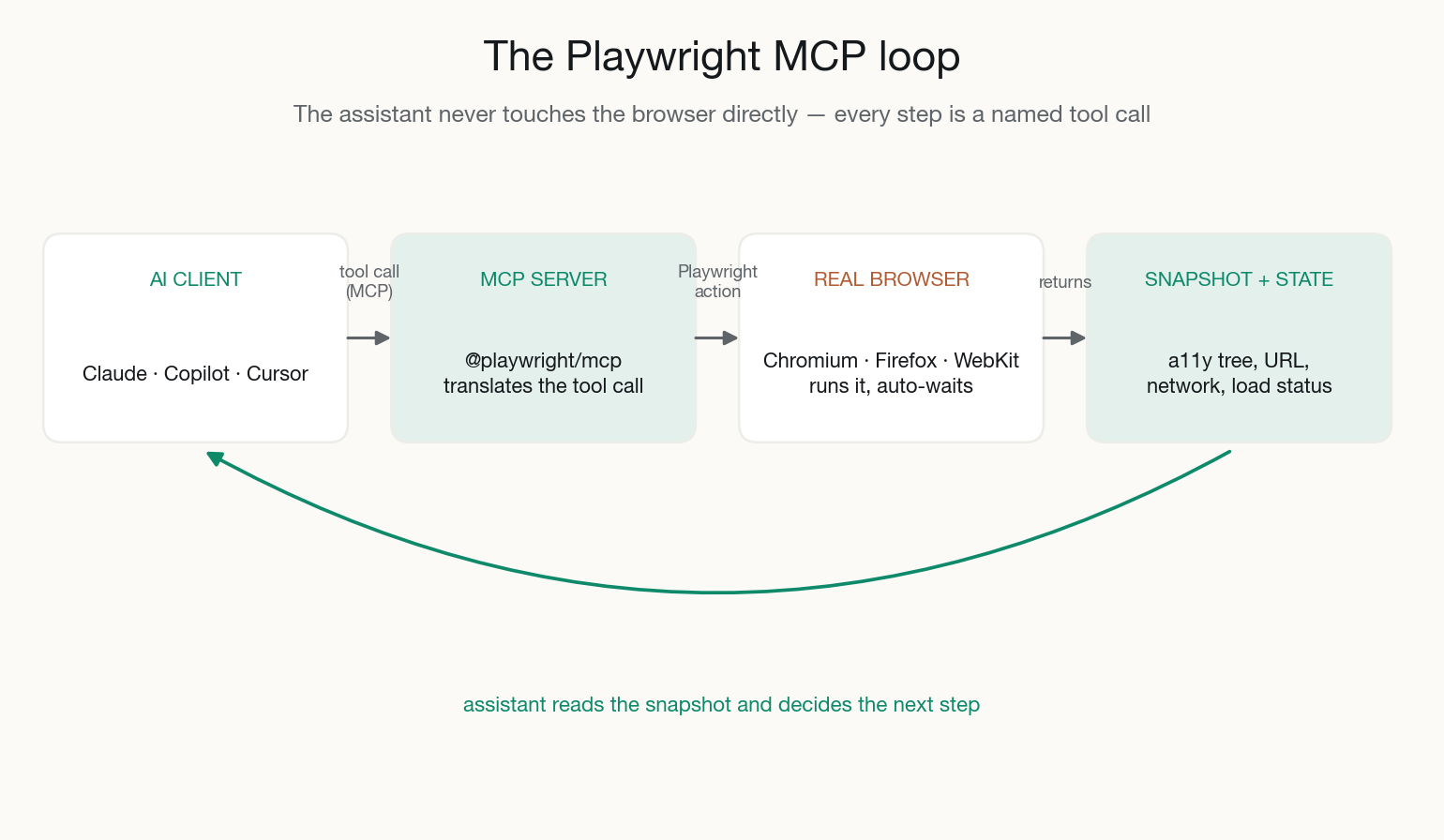
The assistant never touches the browser directly. Every action is a named tool call the server validates and runs — which is exactly why you can reason about what it did.
In a typical exploratory browser-testing session we’ll say something like: “Go to the staging checkout, add two items, apply the promo code SAVE10, and tell me if the total is wrong.”
The assistant strings together browser_navigate, a browser_snapshot to see what’s there, browser_click on the product by ref, browser_type into the promo field, another snapshot to read the total, and a plain-English verdict. If it needs to confirm a background API fired, it calls browser_network_requests and checks. When something’s off, browser_take_screenshot gives us a picture for the bug report.
The honest killer app, for QA work, is turning that session into a durable test. The MCP server pairs naturally with Playwright’s own test agents introduced in v1.56 — the assistant explores the app live through MCP, then generates real @playwright/test TypeScript you commit and run in CI. Explore with the agent; keep the code. That’s the Playwright automation workflow we actually trust.
Playwright MCP vs Selenium
Selenium is the tool most teams are moving from, so this is the comparison we get asked about most. Both drive real browsers, but they were built for different eras — Selenium for scripted, code-first test automation; Playwright MCP for AI-driven browser control.
| Dimension | Playwright MCP | Selenium |
| How the AI targets elements | Accessibility-tree refs (semantic role + name) | CSS/XPath selectors you write by hand |
| Waiting for the page | Built-in auto-waiting | Manual / explicit waits |
| Under-the-hood protocol | Chrome DevTools Protocol over a persistent connection | W3C WebDriver — an HTTP request/response per action |
| AI-agent native | Purpose-built MCP server for LLM clients | No native MCP; code-first, driven via WebDriver |
| How you drive it | Plain English through an MCP client (Claude, Cursor, Copilot) | Code in Java, Python, C#, Ruby, or JavaScript |
| Browsers | Chromium, Firefox, WebKit | All major browsers + a huge grid/legacy ecosystem |
| Native mobile apps | No (web only) | Yes, via Appium |
| Maturity | Pre-1.0, released 2025 | Mature; project since 2004, W3C WebDriver standard since 2018 |
Our verdict: for AI-driven browser testing and exploratory work in 2026, Playwright MCP is the better default — semantic targeting, auto-waiting, and an agent-native interface beat hand-written selectors and per-action WebDriver latency. Selenium still wins when you need strict W3C WebDriver compliance, deep legacy-language integration, or native mobile testing through Appium. For a greenfield AI browser automation project, there’s little reason to reach for Selenium first.
Playwright MCP vs Browser Use
Browser Use is the other name that comes up constantly — one of the fastest-growing open-source AI projects around (100k+ GitHub stars as of July 2026). It’s easy to lump the two together because both let an LLM operate a browser, but they solve different problems.
| Dimension | Playwright MCP | Browser Use |
| What it is | An MCP server that exposes browser tools to any MCP client | A Python framework that is the agent |
| Who runs the agent loop | Your MCP client’s model (Claude, Cursor, Copilot) | Browser Use’s own built-in agent loop |
| Page understanding | Accessibility tree; no vision by default | DOM extraction + optional vision (screenshots) |
| How you use it | Plug it into your editor/assistant and drive it in chat | Write a Python app around it |
| Model support | Any MCP-capable client | Model-agnostic (Claude, GPT, Gemini, …) |
| Best for | Exploratory browser testing + generating committed Playwright tests | Autonomous, multi-step web tasks and agents |
| Under the hood | Playwright | Also built on Playwright |
Our verdict: if you live in an AI editor and want to explore an app, then turn that exploration into committed Playwright test automation, the Playwright MCP server fits your workflow. If you’re building a standalone Python agent that autonomously completes web tasks end to end, Browser Use is purpose-built for exactly that. They’re complementary more than competitive — different layers of the same AI browser automation stack.
When should you use Playwright MCP (and when not)?
We’re fans, but we’d be selling you something if we pretended it’s magic.
Where it shines
It shines at exploratory testing, reproducing a reported bug from a vague description, checking a flow across Chromium/Firefox/WebKit without writing anything, scraping structured content, and bootstrapping test code for a feature you just built. Anything where a human would say “just click around and tell me if it’s broken,” it does well.
Where it bites
It bites in a few predictable places:
- It’s non-deterministic at the decision layer even though the actions are deterministic. Ask the same thing twice and the assistant may take a different route — great for exploration, a headache if you mistake it for a stable test runner.
- It has no idea about your business rules unless you tell it. It’ll happily declare a flow “working” because the buttons clicked, while the tax calculation underneath is quietly wrong.
- On canvas-heavy or WebGL UIs, where there’s no accessibility tree to read, you’re back to vision mode and its guessing. Know which parts of your app it can’t see.
The mental model that keeps teams out of trouble: the MCP server is a brilliant, fast, tireless manual tester who needs a spec. It is not a replacement for a reviewed, asserted, committed test suite. Use it to find things and to draft things — then let a person decide what’s worth keeping. That judgment layer is exactly where a good automation testing practice earns its fee.
Is the Playwright MCP server safe to use?
Skip this section and you’ll regret it, so we’ll keep it short and blunt.
The docs say it plainly: “Playwright MCP is not a security boundary.” When your assistant drives a browser, it can do anything a logged-in user can do — submit forms, delete records, spend money. If you point it at production with real credentials loaded, a confused agent or a prompt-injection attack on a page it visits can take real, destructive actions.
Two rules we don’t bend:
- browser_run_code_unsafe — which runs arbitrary JavaScript in the server process and is, in the docs’ own words, RCE-equivalent — stays off unless the client is one you fully trust.
- Fence the browser: use –isolated profiles, scope –allowed-origins to your staging hosts, and never hand it production write-access “just to try something.”
Treat it like giving a capable contractor the keys — useful, but you scope what they can touch. If you’re rolling this into a team workflow and want the guardrails set properly the first time, that’s the kind of thing worth a short conversation before it’s wired into everyone’s editor.
Frequently asked questions about the Playwright MCP server
What is the Playwright MCP server?
It’s an open-source server from Microsoft (@playwright/mcp) that gives an AI assistant control of a real browser through the Model Context Protocol. The assistant reads the page’s accessibility tree and acts on elements by reference — the foundation for reliable AI browser automation without vision models.
How do I install the Playwright MCP server?
It runs via npx, so there’s nothing to install globally. In Claude Code: claude mcp add playwright npx @playwright/mcp@latest. In VS Code, Cursor, Claude Desktop, or Cline, add a mcpServers entry pointing command at npx with args of [“@playwright/mcp@latest”], then restart the client.
Is the Playwright MCP server free?
Yes. @playwright/mcp is free and open source, and it runs locally through npx — there’s no license or subscription for the server itself. You still pay for whatever LLM your assistant uses.
Do I need to know Playwright to use it?
No — that’s the point. You drive it in plain English through your AI assistant, and it translates your intent into Playwright actions. Knowing Playwright helps enormously when you turn the exploration into a committed test suite, but you can get value on day one without writing a line.
Playwright MCP vs Selenium — which should I use?
For AI-driven browser testing in 2026, Playwright MCP is the better default: semantic accessibility-tree targeting and auto-waiting beat hand-written selectors and per-action WebDriver latency. Choose Selenium for strict W3C WebDriver compliance, deep legacy-language codebases, or native mobile testing via Appium.
Playwright MCP vs Browser Use — what’s the difference?
Playwright MCP is a server you plug into an existing AI client to operate a browser from your editor. Browser Use is a Python framework that ships its own agent loop for building autonomous web agents. Use MCP for exploratory testing and generating Playwright tests; use Browser Use to build a standalone task-completing agent.
Which AI assistants support the Playwright MCP server?
Any MCP-capable client — Claude Code and Claude Desktop, GitHub Copilot in VS Code agent mode, Cursor, Cline, and a growing list. The config is nearly identical across all of them.
Can I run the Playwright MCP server in CI?
Yes — run it –headless, pin the version rather than using @latest, and keep it on trusted origins. But think hard about whether you want a non-deterministic agent gating a pipeline. Most teams we work with use MCP to author and maintain tests, and let the generated deterministic Playwright suite do the actual gating.
Key takeaways
- The Playwright MCP server drives a real browser through the accessibility tree, not pixels — which is what makes AI browser automation deterministic, cheap, and reliable enough for real browser testing.
- Installation is a one-liner via npx, and it works with Claude, Cursor, Copilot, and Cline. Pin the version in CI, because it’s still pre-1.0.
- Playwright MCP vs Selenium: MCP is the better default for AI-driven test automation; Selenium still owns legacy W3C/WebDriver and native-mobile-via-Appium use cases.
- Playwright MCP vs Browser Use: MCP plugs into your editor for exploration and test generation; Browser Use is a Python framework for autonomous agents. Complementary, not rivals.
- Treat it as a fast manual tester, not a committed test suite — explore with it, generate durable Playwright tests, and respect the safety rules (browser_run_code_unsafe off, origins fenced).
Ready to put AI browser automation to work without the guesswork — or to get the guardrails set up right the first time? Talk to the Testvox automation testing team and we’ll help you turn exploratory MCP sessions into a test suite you can actually trust.

17 July 2026
 25 April 2026


AI Test Architect & Lead SDET with 11+ years of expertise in Playwright, API testing, automation, and AI/LLM evaluation. He focuses on delivering high-quality, user-centric software through AI-assisted testing, efficient testing strategies, and continuous innovation. Connect with him on
ABOUT TESTVOX

Testvox is a software testing company help your product reach its full potential. Get full cycle testing for your mobile and web applications while ensuring all quality assurance standards are met... Read More
100+
Applications
Assured
Assured

5 Star Rating

5 Star Rating
“By participating in our release lifecycle, Testvox's standard QA process has helped us to launch quality products faster.”

Rima Hudaifa
Manager | Cadvil
Manager | Cadvil
