
 15 April 2026

Upgrade Your QA Strategy with Playwright Automation
16 April 2026
 8:55 MIN Read time
  BY
Amju
BY
Amju
Flaky tests, slow release cycles, and bugs that slip past manual checks are not just frustrating — they cost startups real money and real users. For CTOs and founders building products in India and the UAE, where speed to market is everything, an unreliable QA process is a serious competitive risk. Playwright has changed what automation can deliver, offering stability and speed that older frameworks simply cannot match. This guide walks you through assessing your current QA setup, preparing your team, implementing Playwright step by step, avoiding the most common mistakes, and measuring the results that actually matter.
Table of Contents
- Assessing your current QA strategy
- Preparing for Playwright adoption: Tools, setup, and team skills
- Implementing Playwright automation: Step-by-step guide
- Avoiding common Playwright mistakes and troubleshooting
- Measuring impact and sustaining QA excellence
- The uncomfortable truth: Why automation alone isn’t enough for QA success
- Take your QA strategy to the next level with expert support
- Frequently asked questions
Key Takeaways
| Point | Details |
|---|---|
| Eliminate flaky tests | Playwright boosts test reliability and trust by raising pass rates up to 98%. |
| Prepare the right foundation | Success with Playwright starts by auditing skills, tools, and aligning your team before rollout. |
| Follow best practices | Avoid common pitfalls like brittle selectors and unoptimized waits for robust, maintainable tests. |
| Iterate for lasting QA impact | Review and refine your automation strategy regularly to deliver sustained business results. |
Assessing your current QA strategy
Before you can fix your QA process, you need to see it clearly. Most startup teams know something is wrong — releases feel risky, tests fail for no obvious reason, and manual effort keeps creeping back in. But diagnosing where the breakdown happens is the first real step.
Common pain points we see across Indian and UAE startups include:
- Slow test cycles that delay releases by days or even weeks
- False positives and negatives that make engineers distrust their own test results
- Brittle test scripts that break every time the UI changes slightly
- Low test coverage leaving critical user flows unverified before launch
To get a clear picture, measure these four core metrics right now: test pass rate, average release speed, hours of manual QA effort per sprint, and percentage of code covered by automated tests. These numbers tell you where automation will deliver the highest return.
Flaky tests deserve special attention because they quietly destroy confidence in your entire QA pipeline. When a test fails 30% of the time for no reproducible reason, engineers start ignoring failures. That is when real bugs get missed. Playwright reduces flaky tests by avoiding hard waits, using expect retries, handling network variability, and isolating state, with benchmarks showing pass rates improving from 68% to 98%.
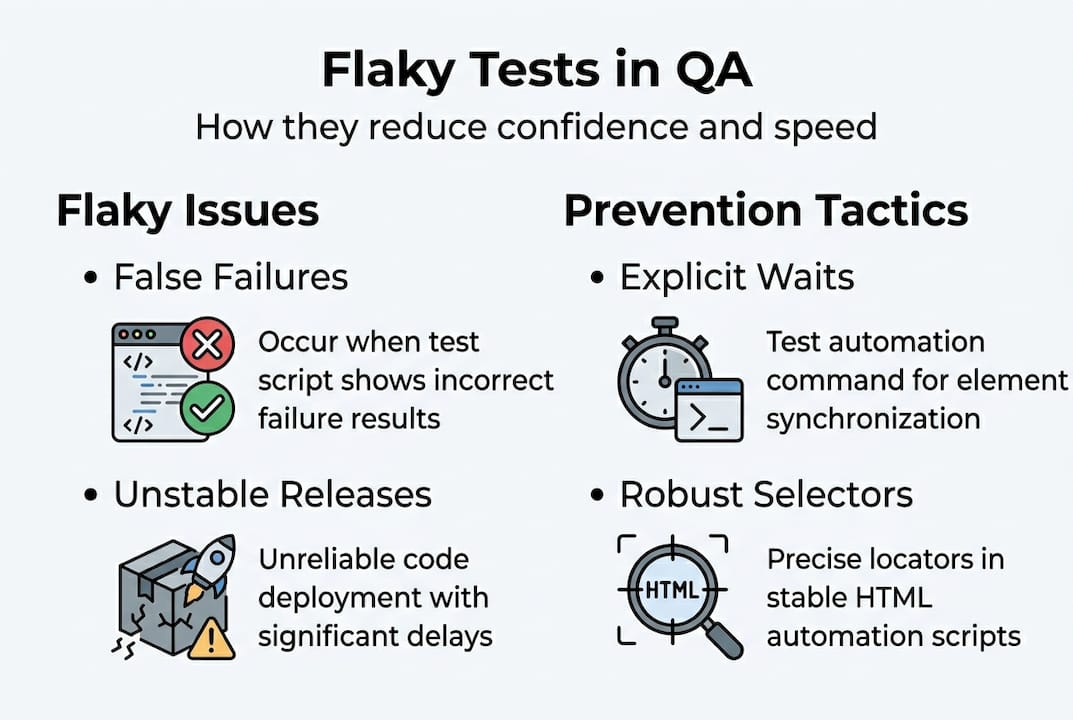
Setting KPIs before you roll out automation is not optional — it is what separates teams that see lasting gains from teams that adopt a tool and then wonder why nothing changed. Define your target pass rate, your acceptable release cadence, and your manual effort ceiling before writing a single automated test.
Here is how a legacy QA approach stacks up against a Playwright-driven one:
| Metric | Legacy QA approach | Playwright-driven QA |
|---|---|---|
| Test pass rate | 60–70% | 95–98% |
| Release cycle time | 1–2 weeks | 2–4 days |
| Manual effort per sprint | 40–60 hours | 8–15 hours |
| Flaky test rate | High (20–40%) | Low (under 3%) |
| Test maintenance burden | Very high | Moderate |
Reviewing your quality engineering standards against these benchmarks gives you a concrete baseline to improve from.
Preparing for Playwright adoption: Tools, setup, and team skills
Once you understand your QA gaps and what Playwright brings, your next step is efficient preparation — here is what you will need.
On the technical side, your checklist should include:
- Node.js environment (version 18 or higher recommended)
- A version-controlled code repository with branching conventions your team already follows
- CI/CD integration (GitHub Actions, GitLab CI, or Azure Pipelines all work well with Playwright)
- A test data strategy that supports parallel runs without conflicts
For your team, the skill requirements are realistic but real. Engineers need working knowledge of JavaScript or TypeScript, a basic understanding of how browser automation works, and the ability to design test data that does not overlap across parallel sessions. You do not need senior automation architects to start, but you do need at least one person who can own the framework.
Here is a quick reference for tools and what they contribute:
| Tool | Role in Playwright setup |
|---|---|
| Playwright Test | Core test runner and assertion library |
| TypeScript | Strongly typed test scripts for fewer runtime errors |
| GitHub Actions | CI/CD pipeline for automated test execution |
| Allure or HTML Reporter | Test result visualization and trend tracking |
| Docker | Consistent browser environments across machines |
Common blockers for Indian and UAE startups include legacy systems that make test isolation harder, resource allocation conflicts where QA competes with feature development, and teams that have never worked with a page object model before. These are solvable, but plan for them.

Avoiding brittle selectors like nth-child or networkidle waits used blindly is one of the most important early decisions your team will make. Role-based locators, explicit loading state waits, and unique test data per parallel worker are the foundation of a resilient framework.
Pro Tip: Invest time in explicit waits from day one. Teams that skip this step spend weeks later debugging intermittent failures that have nothing to do with actual bugs. Review Playwright framework optimization examples to see how this plays out in practice, and consider hiring Playwright engineers if your team needs a head start.
Implementing Playwright automation: Step-by-step guide
With your toolbox and team ready, you can now begin automating tests with Playwright following these essential steps.
- Initialize your project. Run “npm init playwright@latest` to scaffold your project with a default configuration. Choose TypeScript, select your browsers (Chromium, Firefox, WebKit), and set up your base URL.
- Write your first resilient test. Use role-based selectors like
getByRole('button', { name: 'Submit' })instead of CSS class names or XPath. These selectors survive UI redesigns and reflect how real users interact with your app. - Isolate state between tests. Each test should start from a clean state. Use
beforeEachhooks to reset data or re-authenticate, and avoid shared global state that causes one test’s failure to cascade into others. - Handle network variability. Use
page.waitForResponse()orexpect(locator).toBeVisible()with retry logic rather than fixed timeouts. Playwright reduces flaky tests precisely because it retries assertions until they pass or a timeout is reached, not because it waits blindly. - Parallelize your test runs. Configure
workersin yourplaywright.config.tsto run tests concurrently. This alone can cut your CI pipeline time by 60% or more on a typical startup test suite. - Integrate with your CI/CD pipeline. Add a Playwright step to your pipeline config, set it to run on every pull request, and configure it to block merges when tests fail.
Avoid brittle selectors and blind network idle waits to reduce test flakiness. Your test suite is only as trustworthy as its worst locator.
Pro Tip: Use unique test data per worker when running parallel tests. Shared test accounts cause race conditions that look like flaky tests but are actually data conflicts. Pair this with smart automation with RPA tools strategies and solid DevOps in automation practices to keep your pipeline clean.
Avoiding common Playwright mistakes and troubleshooting
A robust rollout can still be derailed by hidden pitfalls. Understanding these mistakes helps you avoid project slowdowns.
The most frequent mistakes we see:
- Using brittle selectors like nth-child, CSS classes tied to styling frameworks, or XPath strings that break on minor DOM changes
- Relying on networkidle blindly without understanding what network activity the page actually generates
- Skipping explicit waits and using fixed
page.waitForTimeout()calls instead - Sharing test data across parallel workers, causing intermittent failures that are nearly impossible to reproduce locally
- Ignoring test isolation, letting one test’s side effects corrupt the next
When a test fails intermittently, your first step is to check whether the failure is selector-based, timing-based, or data-based. Playwright’s trace viewer is your best diagnostic tool here — it records every action, network call, and screenshot so you can replay failures exactly.
Using role-based locators for resilient selection and explicit loading state waits are the two highest-impact fixes for most flaky test suites.
| Bad practice | Recommended Playwright technique |
|---|---|
nth-child selectors |
getByRole() or getByTestId() |
waitForTimeout(3000) |
waitForResponse() or toBeVisible() |
| Shared login accounts | Per-worker unique test users |
networkidle blindly |
Explicit element or response waits |
| Global state between tests | beforeEach state reset hooks |
Reviewing the Playwright optimization case study shows how these fixes translate into measurable pass rate improvements in real startup environments.
Measuring impact and sustaining QA excellence
The final step is not just completing implementation, but proving success and keeping momentum.
The four metrics that matter most after Playwright adoption:
- Test pass rate — your primary signal of suite health
- Test duration — how long your full suite takes in CI
- New bug rate in production — the ultimate measure of QA effectiveness
- Deployment confidence score — a team-reported metric on how safe releases feel
Here is what a realistic before and after looks like:
| Metric | Before Playwright | After Playwright |
|---|---|---|
| Test pass rate | 68% | 98% |
| CI pipeline duration | 45 minutes | 18 minutes |
| Production bugs per release | 8–12 | 1–3 |
| Manual QA hours per sprint | 50 hours | 12 hours |
Statistic to remember: Pass rates from 68% to 98% are achievable with disciplined Playwright best practices — that is not a marketing claim, it is a documented benchmark.
Building feedback loops means reviewing these metrics every sprint, not every quarter. Set a monthly QA retrospective where your team asks: which tests failed most often, which selectors broke, and where did manual effort creep back in? That conversation is what keeps your automation healthy over time.
When you are ready to scale, extend Playwright to cover new environments (mobile web, staging, pre-production) and new user flows as your product grows. Explore Playwright ROI examples to benchmark your own progress against real-world results.
The uncomfortable truth: Why automation alone isn’t enough for QA success
All the tactics above set you up for success — but here is what most guides never mention about lasting QA transformation.
Automation amplifies whatever QA culture already exists on your team. If your processes are unclear, your ownership is diffuse, and your feedback loops are weak, Playwright will make those problems faster and more visible, not smaller. We have seen startups invest heavily in automation tooling and end up with a larger, more complex suite of unreliable tests.
Real QA transformation is a cultural shift. Someone has to own the test suite.
Ownership of the test suite is essential. Failures must be reviewed with discipline, not ignored. Equally important is knowing when a test no longer adds value—and removing it without hesitation. These are human decisions that no framework makes for you.
The teams that see the best long-term results from Playwright are the ones that treat their test suite like production code — reviewed, refactored, and improved every month. Make QA review a recurring sprint ritual, not an afterthought. Read more on production-led QA insights to understand what this shift looks like in practice.
Pro Tip: Schedule a 30-minute QA retrospective every sprint. Ask which tests failed, which were deleted, and which new flows need coverage. This single habit compounds into dramatically better test quality over six months.
Take your QA strategy to the next level with expert support
Ready for expert Playwright support or want results fast? Here is how Testvox can help.
At Testvox, we work with scaling startups in India and the UAE to build Playwright automation frameworks that actually hold up under real product pressure. Whether you need Playwright-qualified engineers embedded in your team or a fast-turnaround QA audit, we bring hands-on experience from fintech and e-commerce environments where reliability is non-negotiable.

Check out our QA auditing for startups case study to see how we helped a Y Combinator startup get test-ready fast. Browse our automation case studies to find examples that match your stack and growth stage. Reach out to us directly to discuss auditing your current QA setup or architecting a Playwright strategy built for your release velocity.
Frequently asked questions
What makes Playwright better than Selenium for startups?
Playwright tests are more resilient to UI changes, and Playwright reduces flaky tests through built-in expect retries and smart waiting, making it far more reliable for modern web apps than Selenium’s older architecture.
How long does it take to set up Playwright automation?
Most startups can launch basic Playwright test suites in a few days and reach continuous integration within 2 to 4 weeks, depending on team familiarity with TypeScript and existing CI/CD infrastructure.
What are the biggest mistakes to avoid when using Playwright?
Avoid brittle locators, using networkidle blindly, and skipping explicit waits — role-based locators and explicit waits are the two practices that most directly reduce flaky, unreliable tests.
How can I measure Playwright automation ROI?
Track test pass rate, failed deployment rate, production bug count per release, and QA cycle time before and after Playwright adoption — these four metrics together give you a complete picture of automation value.
Recommended
- How Testvox Optimized a Playwright Automation Framework – Testvox
- Hire Automation Test Engineer | Playwright, Selenium, AI Tools – Testvox
- A 5-Year-long Software Testing Partnership of Excellence
- The Death of Brittle Scripts: Why Production-Led Quality Engineering is the New Standard for 2026 – Testvox
15 April 2026
 27 November 2025
 18 December 2024

ABOUT TESTVOX

Testvox is a software testing company help your product reach its full potential. Get full cycle testing for your mobile and web applications while ensuring all quality assurance standards are met... Read More
100+
Applications
Assured
Assured

5 Star Rating

5 Star Rating
“By participating in our release lifecycle, Testvox's standard QA process has helped us to launch quality products faster.”

Rima Hudaifa
Manager | Cadvil
Manager | Cadvil
