
 2 June 2026

What Is Integration Testing: a Developer’s Guide
25 May 2026
 9:33 MIN Read time
  BY
Amju
BY
Amju
Most developers understand unit testing well enough. Write a function, write a test, confirm the output. Integration testing is where things get genuinely interesting, and often misunderstood. It is not just unit testing at a larger scale. Integration testing specifically targets what happens when components talk to each other, and those conversations surface defects that isolated tests will never catch. This guide breaks down what integration testing is, how it fits into modern workflows, which techniques actually work, and how to avoid the pitfalls that slow most teams down.
Table of Contents
- Key takeaways
- What integration testing actually is
- Integration testing approaches and techniques
- Integration testing in CI/CD pipelines
- Tools and frameworks for integration testing
- Integration testing best practices and pitfalls
- My take on where integration testing really earns its value
- How Testvox can strengthen your integration testing
- FAQ
Key takeaways
| Point | Details |
|---|---|
| Integration testing fills a unique gap | It catches defects at component boundaries that unit tests cannot detect, no matter how thorough. |
| Two levels exist for good reason | Component integration tests run fast and cover internal interfaces; system integration tests cover end-to-end flows. |
| Methodology choice affects debugging speed | Big-bang approaches make failure diagnosis painful; incremental approaches isolate problems faster. |
| CI/CD placement matters as much as coverage | Running integration tests on merge rather than every pull request keeps pipelines fast without sacrificing confidence. |
| Scope discipline is non-negotiable | Narrowly scoped integration tests with clean test data deliver faster feedback and far less flakiness. |
What integration testing actually is
Integration testing focuses on interactions between components or systems, and it runs after unit testing to verify that interfaces and communication paths work correctly. The ISTQB definition is precise: integration testing validates how modules interact, not how they function independently. That distinction matters more than most teams realize.
A payment module might pass every unit test in isolation. The API client that wraps it might also pass all its unit tests cleanly. But when those two components exchange data with a real authentication token and a live configuration file, you may discover that the token format one component produces does not match what the other expects. That bug does not exist in either component alone. It exists in the space between them.
IBM describes integration testing as joining modules and evaluating their combined behavior to verify dependable communication and interaction. The emphasis is on realistic scenarios centered around integration points, which are the places in your system where data, control flow, or state crosses a boundary between components.

Component vs. system integration testing
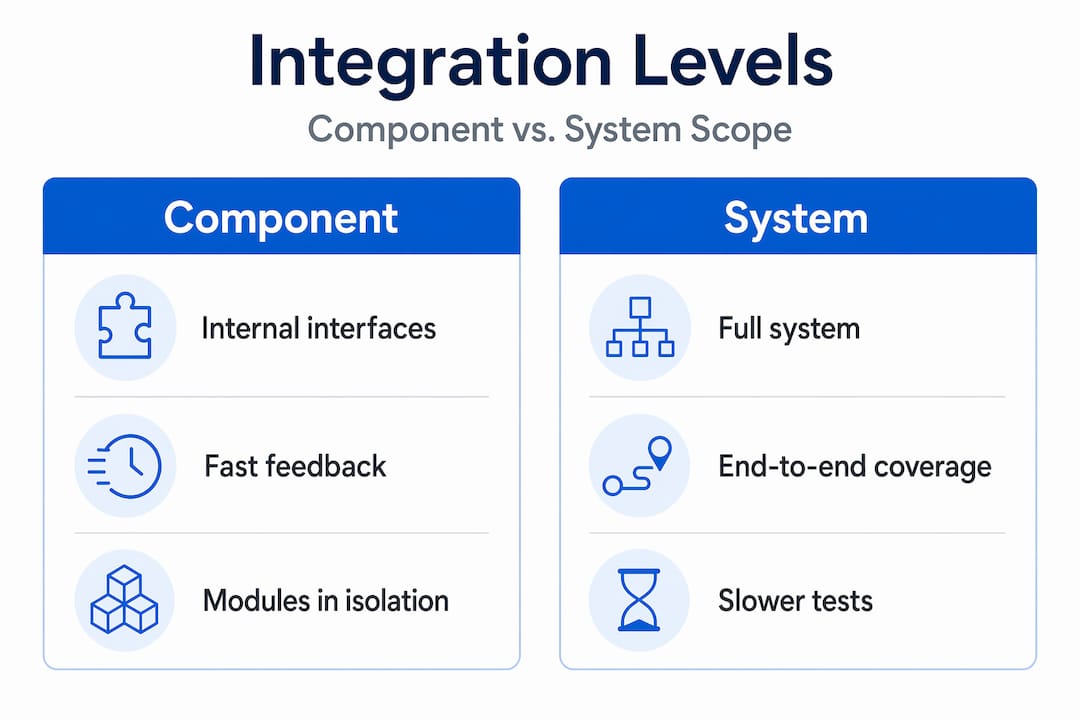
Splitting integration testing into two levels gives teams a practical way to balance speed with coverage. Component integration testing (sometimes called low-level integration testing) focuses on internal module interfaces within a single application. It runs relatively fast and is closest to unit testing in scope. System integration testing covers end-to-end interactions across services, databases, third-party APIs, and external systems.
| Level | Scope | Speed | Primary target |
|---|---|---|---|
| Component integration | Internal module interfaces | Fast | Interface contracts, data passing |
| System integration | Cross-service, external systems | Slower | End-to-end flows, real dependencies |
| Unit testing | Single function or class | Fastest | Logic and computation |
Most teams need both levels. Running only system integration tests is slow and expensive. Running only component integration tests leaves gaps at service boundaries where the real surprises often live.
Integration testing approaches and techniques
Three primary approaches define how teams structure integration testing: Big-bang, Top-down, and Bottom-up. Each comes with distinct tradeoffs in complexity and failure isolation.
- Big-bang integration: All modules are integrated simultaneously and tested as a whole. This sounds efficient, but when something breaks, isolating the cause is genuinely painful. You are debugging an assembled system with no breadcrumbs about which integration point introduced the defect.
- Top-down integration: Testing starts from the top-level modules and works downward, using stubs to simulate lower-level components that have not yet been integrated. This approach works well when your user-facing workflows need early validation, but writing and maintaining stubs adds overhead.
- Bottom-up integration: Testing starts from lower-level components and builds upward, using drivers to simulate higher-level callers. Failure isolation is cleaner than big-bang because you confirm each layer before adding the next.
Incremental approaches (top-down and bottom-up) are superior for diagnosability. Integration test failures are harder to diagnose than unit test failures by design, because the defect lives between components. Incremental methods at least narrow the search space.
One key decision in any integration testing strategy is whether to use real or mocked dependencies. Integration tests catch defects unit tests miss precisely because they use real or near-real dependencies instead of mocks. A mocked database never reveals a misconfigured connection pool. A real one does, quickly.
Pro Tip: Use real dependencies for integration tests wherever feasible, and reserve mocks for external services you cannot reliably spin up in a test environment, such as third-party payment gateways or SMS providers.
Integration testing in CI/CD pipelines
Modern development teams run tests continuously, which means the placement of integration tests inside your pipeline is as important as the tests themselves. Get the placement wrong and you either slow every developer to a crawl or miss defects before they reach production.
A staged approach is standard practice:
- On every commit: Run unit tests. They are fast, deterministic, and give developers immediate feedback within seconds.
- On every pull request: Run a subset of component integration tests that cover the specific modules touched by the change. Keep this fast, under five minutes ideally.
- On merge to the main branch: Run the full integration test suite, including system integration tests and any tests that hit real external dependencies or require database setup.
- Nightly or pre-release: Run your most expensive end-to-end and performance tests that would be impractical to run on every merge.
Integration tests run on merge rather than on every pull request, which avoids slowing the feedback loop while still validating critical integration points before code reaches the main branch. This is a discipline most teams learn the hard way after watching their CI pipeline balloon to 45 minutes.
Managing scope and timing is the real challenge. Too many integration tests running too often cause delays and make debugging larger failures even harder. The solution is to be deliberate about what each stage of your pipeline is actually supposed to validate.
For teams working within DevOps pipelines, the principles around test automation in DevTestOps apply directly: match your test scope to your branching strategy, and make sure integration tests gate merges to main, not individual commits.
Pro Tip: If your integration test suite takes longer than 15 minutes to run, split it. A fast subset should run on merge, and the full suite can run nightly. Never let test duration become a reason to skip running them.
Tools and frameworks for integration testing
Choosing the right tool depends on what kind of integration you are testing. UI flows, API contracts, and service-level interactions each call for different approaches.
- Selenium: Browser-based UI testing. Best for validating that front-end components integrate correctly with back-end APIs when rendered in a real browser. Not ideal for pure API or service-level integration testing.
- TestComplete: Covers both UI and API automation. Works well for teams that need a single tool to handle multiple integration testing scenarios across desktop, web, and mobile.
- Apache JMeter: Originally designed for performance testing, but capable of API-level integration testing with request chaining and data parameterization. Useful for validating integration points under load.
Popular integration testing tools include Selenium, TestComplete, and JMeter, each targeting different layers of integration validation. The right choice depends on your stack, your team’s scripting comfort, and whether you need API-level or UI-level coverage.
For teams evaluating automation tooling more broadly, this 2026 automation tools guide covers decision criteria that apply directly to integration testing tool selection.
Beyond tool choice, consider test environment parity. Integration tests that pass in a local Docker environment but fail in staging are telling you something about environment configuration, not necessarily your code. Standardizing your environments eliminates an entire category of false positives.
Pro Tip: Before adopting a new integration testing tool, prototype one realistic end-to-end integration scenario with it. If setting up that one scenario takes more than a day, reconsider whether the tool actually fits your team’s workflow.
Integration testing best practices and pitfalls
Getting integration testing right requires discipline at the planning stage, not just the execution stage. Risk-based prioritization of integration points reduces test suite size while maximizing coverage of the interactions that matter most.
The most common pitfalls teams encounter:
- Testing everything at once: Combining too many components in a single test makes failures almost impossible to isolate. Narrow your scope intentionally.
- Skipping test data setup and cleanup: Integration tests that share state across runs produce flaky results. Each test should set up its own data and clean up after itself, always.
- Over-relying on mocks: Heavy mocking in integration tests defeats their purpose. If you mock the database, the message queue, and the external API, what exactly are you integrating?
- Ignoring test suite duration: Slow tests get skipped. Keep individual integration tests focused and your total suite time well within acceptable CI bounds.
- No regression layer: Integration testing workflows should include a regression stage that re-runs relevant tests after any fix to confirm the defect is resolved and nothing adjacent broke.
IBM notes that integration testing protects an organization’s reputation by confirming that assembled components work dependably in real business contexts. For fintech and e-commerce applications in particular, a payment flow that works in isolation but fails when the cart, the payment processor, and the fraud detection service interact together is a production incident waiting to happen.
For a deeper comparison with unit testing at the foundational level, the resource on unit testing for application software clarifies where each test level begins and ends.
My take on where integration testing really earns its value
I have worked on enough QA engagements to say this plainly: the teams that treat integration testing as a checkbox exercise always discover they needed it when it is too late. A startup preparing for beta launch runs their unit tests, sees green, ships, and finds out in production that their third-party KYC service returns a slightly different JSON schema than the mock they used during development. That defect could have been caught in a 20-minute integration test run against a real sandbox environment.
What I have found actually works is treating integration testing as a design activity, not just a verification activity. Integration testing is design-driven around integration points, and when teams map those points early, they catch interface mismatches before they get buried inside a release candidate. The teams that do this well build integration tests as they define their API contracts, not after the fact.
The anti-pattern I see most often is the big-bang integration test suite that someone runs once a week and never looks at until something obviously breaks. That is not integration testing. That is a slow integration fire alarm. You need progressive confidence. Unit tests first. Component integration on merge. System integration before release. Each layer builds on the last, and each layer catches something the previous one cannot.
My advice: start with the three integration points in your application that would cause the most damage if they failed in production. Write tests for those first. Then expand. Scope discipline early on saves you from a bloated, flaky test suite six months later.
— Testvox
How Testvox can strengthen your integration testing

At Testvox, we have seen what happens when integration testing is bolted on at the end rather than built into the process. It shows up as expensive rework, last-minute release delays, and, in fintech and e-commerce contexts, production failures at the worst possible moments. Our QA engineering teams work alongside development teams to build integration testing strategies that fit real-world CI/CD workflows, not theoretical ones.
Whether you need a full QA audit of your existing test coverage or a rapid integration testing engagement like our work on a Y Combinator startup’s pre-launch QA, Testvox brings hands-on experience with the kinds of integration challenges that actually matter. If your application handles payments, user data, or third-party service dependencies, your integration test coverage deserves a hard look. Reach out to the Testvox team to see where the gaps are before your users find them.
FAQ
What is integration testing in software development?
Integration testing is a test level that verifies how components or systems interact with each other, catching defects at the boundaries between modules that unit tests cannot detect.
How is integration testing different from unit testing?
Unit tests verify individual functions in isolation using mocks, while integration tests use real or near-real dependencies to validate that multiple components work correctly together.
What are the main types of integration testing?
The main types are Big-bang, Top-down, and Bottom-up integration testing, along with component integration testing and system integration testing, each suited to different scopes and risk profiles.
When should integration tests run in a CI/CD pipeline?
Integration tests should run on merge to the main branch rather than on every pull request, keeping developer feedback loops fast while still validating critical integration points before code advances.
Why is integration testing important for production reliability?
Integration testing catches interface mismatches, configuration errors, and data contract violations between components, problems that only appear when modules actually communicate in a realistic environment.
Recommended
- API Authentication Testing | Composio.dev Integration Case Study
- Can I perform testing with a developer? – Testvox
- Software Testing Process Optimization | QA Case Study
- Partnering with a Professional Testing Company – Benefits
2 June 2026
 29 October 2024


ABOUT TESTVOX

Testvox is a software testing company help your product reach its full potential. Get full cycle testing for your mobile and web applications while ensuring all quality assurance standards are met... Read More
100+
Applications
Assured
Assured

5 Star Rating

5 Star Rating
“By participating in our release lifecycle, Testvox's standard QA process has helped us to launch quality products faster.”

Rima Hudaifa
Manager | Cadvil
Manager | Cadvil
